Understanding Consent Management in Uniform

TL;DR
If you are looking for the essential answers, see the table below and check out the FAQ at the end of the article.
What you need to know | Details |
|---|---|
Two consent settings exist | Storage consent controls cookie persistence. |
A/B tests always run | Consent settings don't block A/B tests. They always execute. |
Without consent, A/B tests don't persist | Variant assignments are stored in memory only. Page refresh = new random variant. |
| When enabled, visitors without consent see only default content. A/B tests are unaffected. |
Geo-based defaults are possible | Set consent ON by default in US, OFF in EU/UK using edge detection. |
Consent can change mid-session | Granting consent saves all in-memory data to cookies. Revoking consent deletes cookies immediately. |
Quick decision guide:
- Want personalization to work before consent? → Leave
requireConsentForPersonalizationdisabled (default) - Want to completely block personalization without consent? → Enable
requireConsentForPersonalization - Need accurate A/B test results? → Encourage visitors to grant consent for consistent variant assignment
This guide explains how Uniform’s consent management works, how it integrates with external consent management platforms (like OneTrust, Cookiebot, or similar), and what happens to personalization and A/B testing when visitors haven’t provided consent.
How Consent Works in Uniform
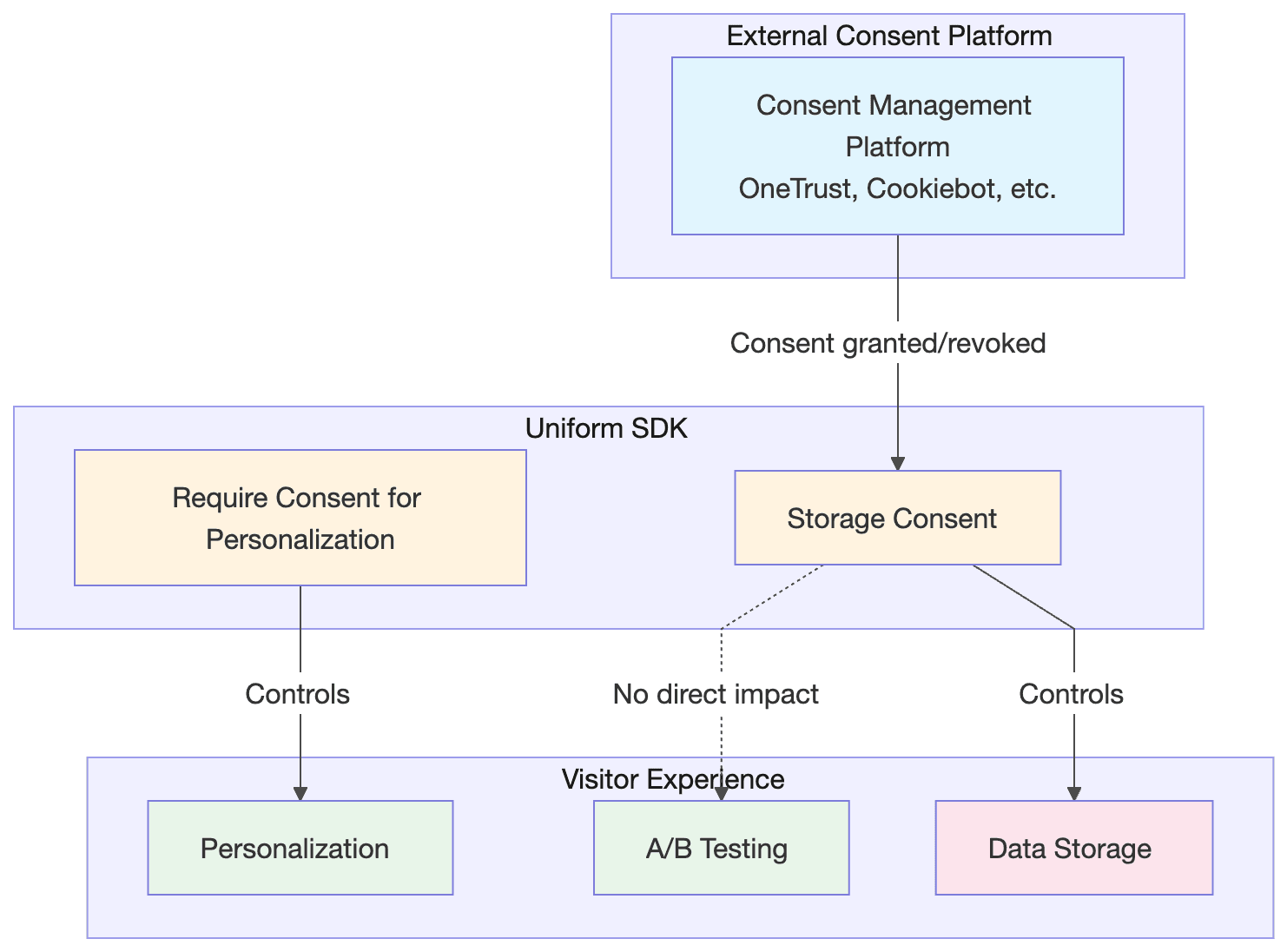
Uniform’s SDK operates with two distinct consent-related concepts:
- Storage Consent — Whether visitor data can be persisted (saved to cookies/browser storage)
- Personalization Consent — Whether personalization logic should run at all
These two settings give you flexibility in how you handle different regulatory requirements and user preferences.
Storage Consent: Persisting Visitor Data
Storage consent determines whether Uniform can save visitor data to cookies or browser storage. This is the primary consent mechanism that connects to external consent management platforms.
Storage Consent Status | What Happens |
|---|---|
Granted | Visitor data (scores, quirks, test selections) is saved to cookies. Data persists across page loads and sessions. |
Not Granted | Visitor data is stored in memory only. All data is lost when the page is refreshed or the browser is closed. |
Integration with External Consent Platforms
When using an external consent management platform like OneTrust:
- Your consent platform collects the visitor’s consent choice
- Your website notifies Uniform’s SDK of the consent status
- Uniform updates its storage behavior accordingly
If consent is later revoked, Uniform will delete any stored cookies and revert to in-memory storage only.
Personalization Consent: The requireConsentForPersonalization Setting
This setting adds an additional layer of control specifically for personalization. When enabled:
Consent Status | Personalization Behavior |
|---|---|
Consent granted | Personalization runs normally, showing tailored content based on visitor behavior and attributes |
Consent not granted | Personalization is completely disabled. Visitors see only default (unpersonalized) content |
This setting is useful for organizations that interpret privacy regulations strictly and want to ensure no personalization occurs until explicit consent is obtained.
Key Point: This setting affects personalization only. It does not affect A/B testing.
How A/B Testing Handles Consent
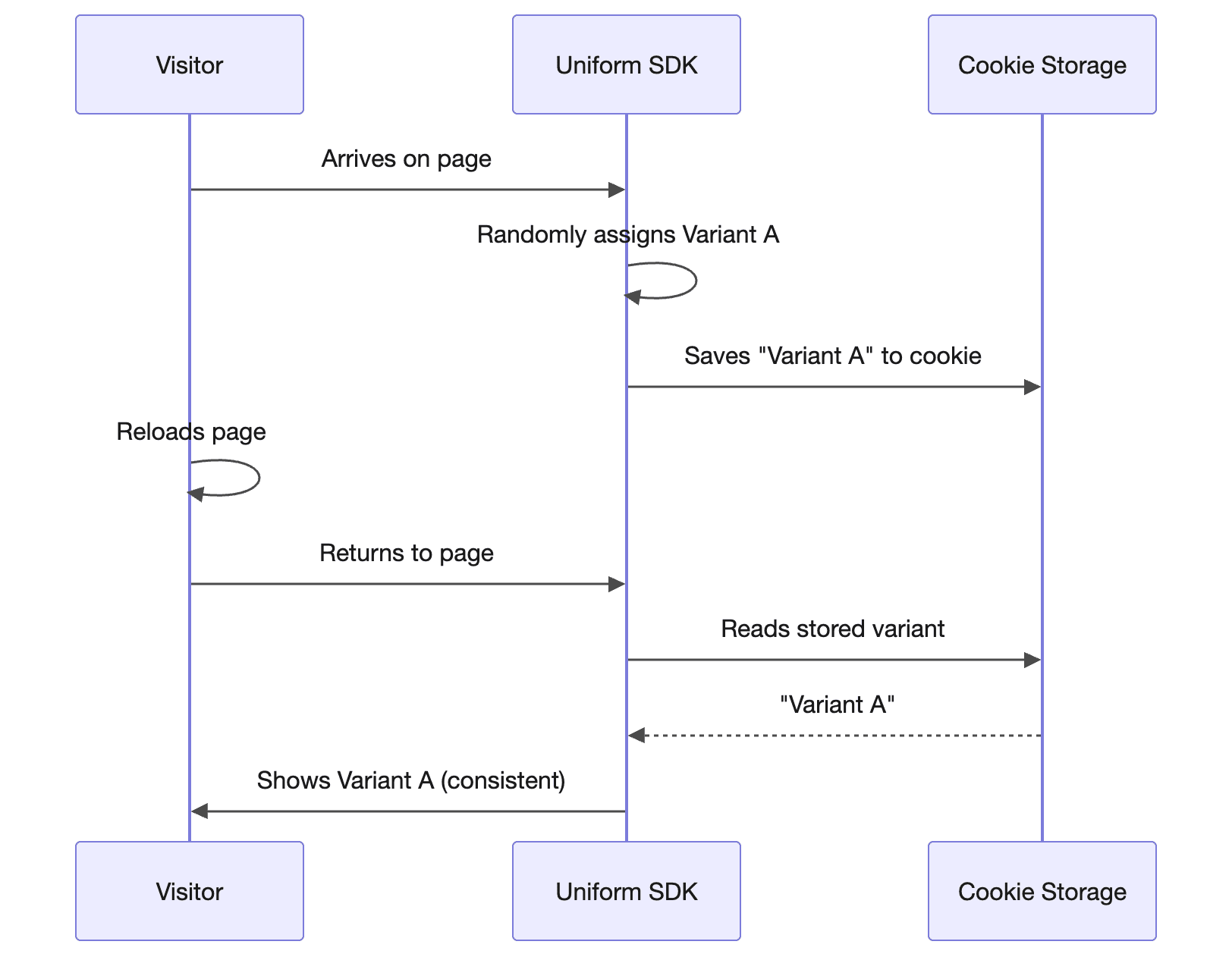
A/B testing in Uniform operates differently from personalization. A/B tests always run regardless of consent status. Here’s why and what happens:
Why A/B Tests Run Without Consent
A/B testing randomly assigns visitors to variants — it doesn’t use behavioral data or personal information to make decisions. The random assignment is considered less privacy-invasive than behavioral personalization.
What Changes Based on Consent
Consent Status | A/B Test Behavior |
|---|---|
Granted | Variant assignment is saved. Visitor sees the same variant consistently across page loads and sessions. Test results are reliable. |
Not Granted | Variant assignment is stored in memory only. Each page refresh triggers a new random assignment. The visitor may see different variants on each page load. |
Impact on Test Results
When running A/B tests with visitors who haven’t granted consent:
- Test execution continues normally
- Variant consistency is not guaranteed across page loads
- Analytics accuracy may be affected for non-consenting visitors since they could be counted in multiple variant groups
For the most accurate A/B test results, encouraging visitors to grant consent ensures consistent variant assignment throughout their session.
Geographic Default Consent Settings
Different regions have different privacy regulations:
- United States — Generally more permissive; consent is often implied
- European Union / UK — GDPR requires explicit opt-in consent
- Other regions — Varying requirements
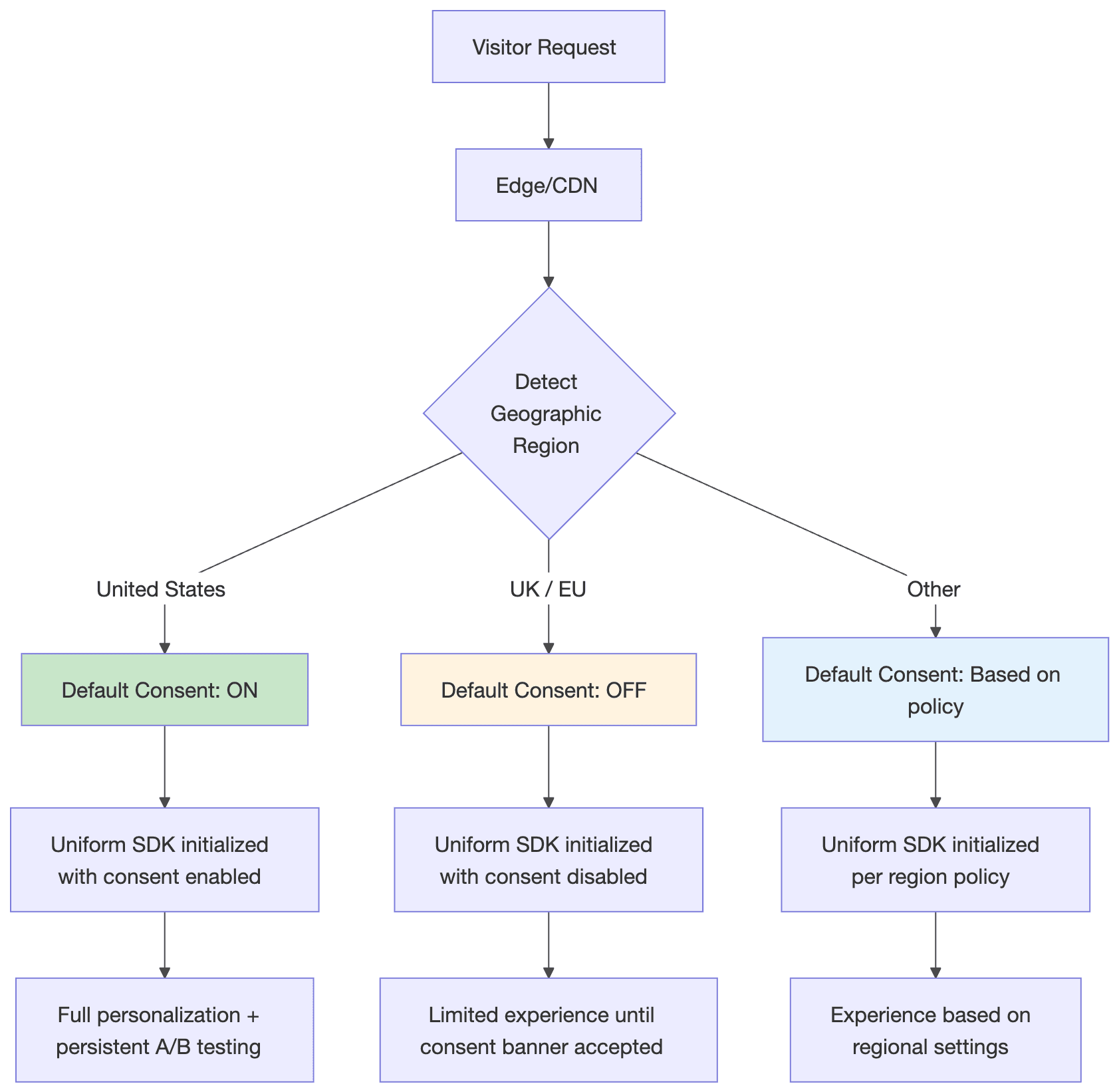
Uniform allows you to configure different default consent values based on the visitor’s geographic location. This is typically implemented at the edge (CDN level) where the visitor’s location can be determined.
Example Regional Configuration
Region | Default Consent | Rationale |
|---|---|---|
United States | Enabled | Implied consent model common in US |
European Union | Disabled | GDPR requires explicit opt-in |
United Kingdom | Disabled | UK GDPR maintains similar requirements |
California | Disabled | CCPA provides opt-out rights |
Rest of World | Configurable | Based on your organization’s policy |
This approach ensures compliance while maximizing the personalized experience for visitors in regions with more permissive regulations.
Updating Consent at Runtime
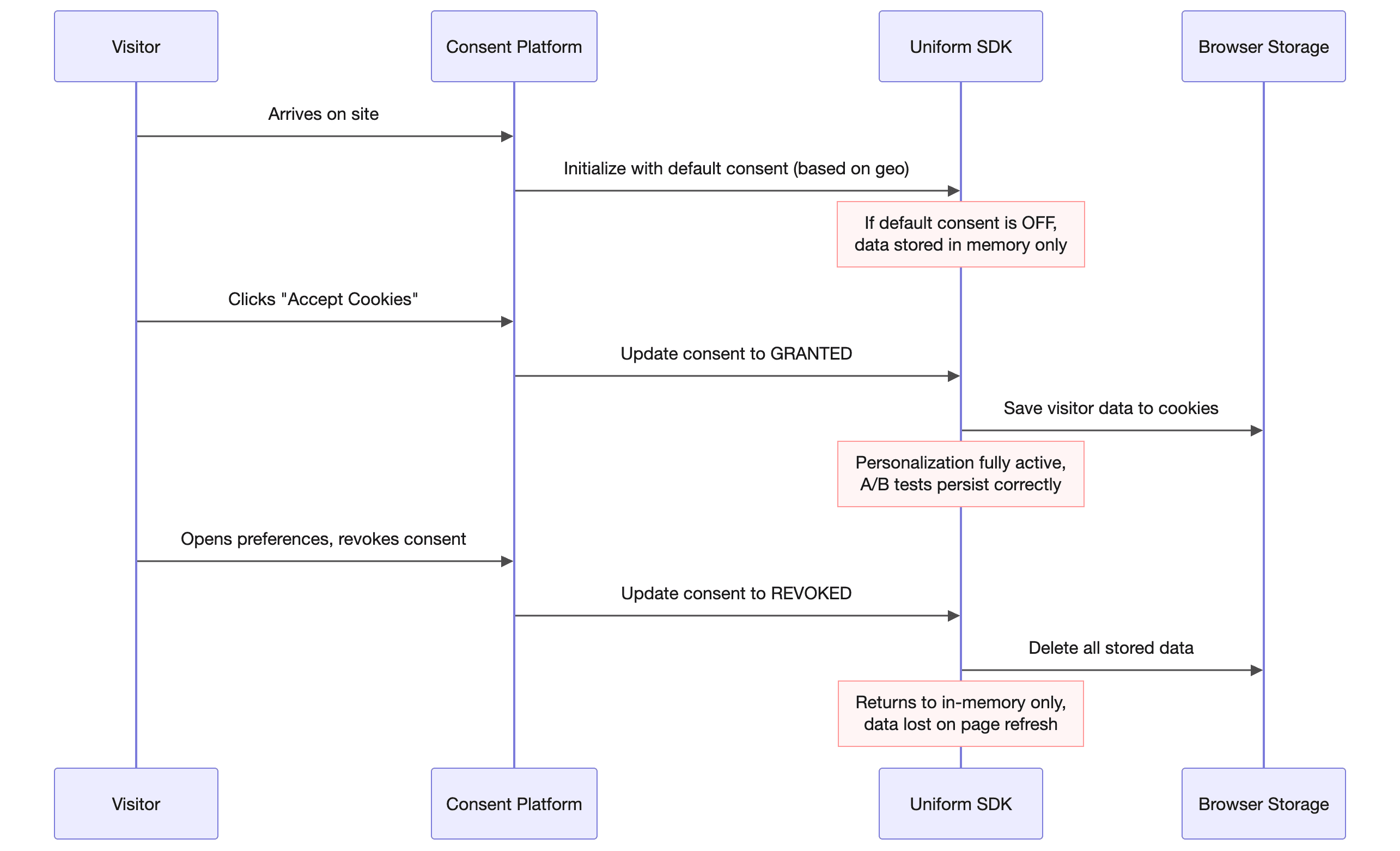
Consent isn’t a one-time setting — it can change during a visitor’s session:
- Initial state — Consent is set based on default configuration (potentially geo-based)
- Consent granted — When a visitor accepts cookies via your consent banner, Uniform is notified and begins persisting data
- Consent revoked — If a visitor later revokes consent (e.g., via a “Manage Preferences” option), Uniform deletes stored data and reverts to in-memory storage
What Happens When Consent Changes
Consent Change | Immediate Effect |
|---|---|
Granted | Current in-memory data is written to cookies. Future page loads will remember visitor state. |
Revoked | All cookies are deleted. Current session continues with in-memory data, but nothing persists after page refresh. |
Summary: Consent Impact Matrix
Feature | Storage Consent OFF | Storage Consent ON |
|
|---|---|---|---|
Personalization | Runs (in-memory) | Runs (persisted) | Disabled completely |
A/B Testing | Runs (not persisted) | Runs (persisted) | Runs (not persisted) |
Visitor Scores | Calculated but not saved | Calculated and saved | Not calculated |
Quirks | Set but not saved | Set and saved | Set but not saved |
Cross-session consistency | No | Yes | No |
Best Practices
- Choose the right consent model for your regions — Use geo-based default consent to balance user experience with compliance requirements.
- Consider A/B test accuracy — If accurate A/B testing is critical, design your consent experience to encourage acceptance, or segment your analytics to account for non-consenting visitors.
- Use
requireConsentForPersonalizationthoughtfully — Only enable this if your legal team requires that personalization not occur without explicit consent. For many organizations, the default storage consent mechanism is sufficient. - Test both consent states — Ensure your website provides a good experience for both consenting and non-consenting visitors.
- Integrate with your consent platform — Ensure your consent management platform (OneTrust, Cookiebot, etc.) properly notifies Uniform when consent status changes.
FAQ
- Does
requireConsentForPersonalizationaffect A/B testing?
No. TherequireConsentForPersonalizationsetting only affects personalization. A/B tests will always run regardless of this setting or consent status. - Will A/B tests still work if a visitor hasn't given consent?
Yes, but with a caveat. A/B tests will execute and assign a variant to the visitor. However, without consent, the variant assignment is stored in memory only. If the visitor reloads the page, they may be assigned a different variant. - If consent is not given, will reloading the page assign a different A/B test variant?
Possibly, yes. Without consent, variant assignments are not persisted to cookies. Each page load triggers a new random assignment, so the visitor could see a different variant after refreshing the page. - Does this affect A/B test accuracy?
It can. Visitors without consent may be counted in multiple variant groups across their session, which can skew test results. For the most accurate A/B testing, consistent variant assignment (which requires consent) is recommended. - Should I disable A/B testing for visitors without consent?
That's a business decision. Uniform doesn't disable A/B testing based on consent because random assignment doesn't use personal data. However, if consistent measurement is critical, you may want to exclude non-consenting visitors from your analytics.