Identity delegation
What identity delegation is#
Identity delegation lets your Mesh integration call Uniform APIs as the signed-in dashboard user (a real person) instead of as a shared, static service account. Each call is attributed to that user and runs with that user's permissions.
Mesh integrations are custom applications with their own deployments, embedded as iframes in the Uniform dashboard. When one needs to create or update Uniform entities, it authenticates to the Uniform APIs through the SDK clients, but because it runs in an iframe, it doesn't inherit the current user's session or permissions.
Without identity delegation, the usual workaround is to build a custom backend-for-frontend (BFF), a small server of your own that sits between the iframe and Uniform, and inject a static service account. That works, but it has real drawbacks:
- The service account isn't tied to any person. Every call runs with the same fixed permissions and carries no per-user attribution.
- The BFF is publicly exposed, so it needs its own authentication layer. Without one, unauthorized callers could drive its service-account credentials and make content updates they should never be allowed to make.
Identity delegation closes that gap: Uniform mints a short-lived credential scoped to the person using the dashboard, your server exchanges it with your integration secret, and subsequent Uniform API calls run as that user.
When to use it#
Reach for identity delegation when your integration creates or modifies data through Uniform SDKs on behalf of the person using it, and that person's identity matters. For example:
- An importer that writes entries, compositions, or assets into a project, so the changes are attributed to the user who ran the import and respect that user's permissions.
- A custom content editor or authoring tool that reads and writes Uniform content from inside a Mesh location, where each editor should only be able to do what their Uniform role allows.
With delegation, those calls are made on behalf of the signed-in user, so:
- History logs show the real user as the actor.
- Authorization runs against that user's Uniform roles and permissions.
- You don't distribute or rotate long-lived service account keys for interactive flows.
The delegation access token carries the user's full authority
A delegation access token has the same API authority as the signed-in user's own session. It is not a read-only or project-scoped subset. If the user is a team admin, the token can perform admin actions too (member and role management, integration credential rotation, team settings, and other admin-gated operations). Expose via BFF only the APIs your integration actually needs.
Get started#
The fastest path is to start from the reference integration, enable delegation on the manifest, and wire credentials into your app environment.
Prerequisites
- A Uniform team and project
- Permission to create or edit a custom Mesh integration
- Local HTTPS (required for delegation cookies; the example uses
next dev --experimental-https) - Uniform npm packages 20.72.3 or higher (identity delegation is available only from this version of
@uniformdev/mesh-sdk,@uniformdev/mesh-sdk-react, and related@uniformdev/*packages)
1. Start from the example#
Clone the mesh-auth reference app. It is a minimal Next.js Mesh integration that demonstrates the full delegation lifecycle through a project tool.
2. Enable identity delegation on the manifest#
In your custom integration definition (Settings → Custom Integrations), set "identityDelegation": true on the manifest and point baseLocationUrl at your HTTPS origin (local or deployed).
mesh-manifest.json (excerpt)
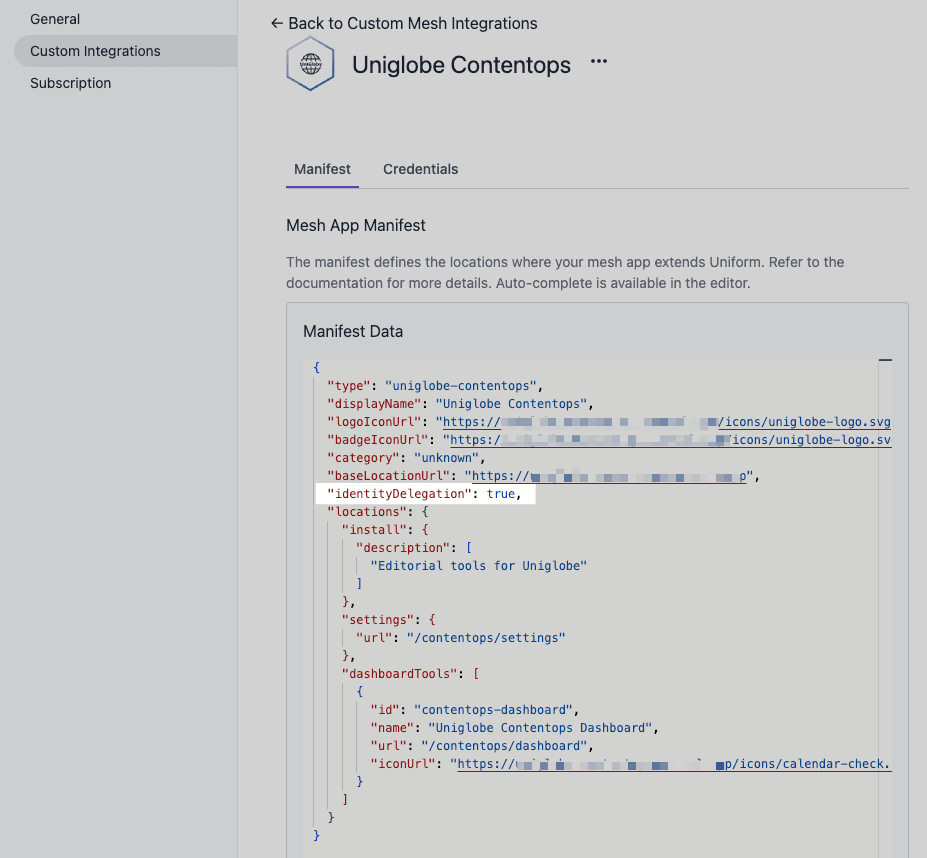
Register or update the integration, then install it on a project.
3. Generate secrets and fill .env#
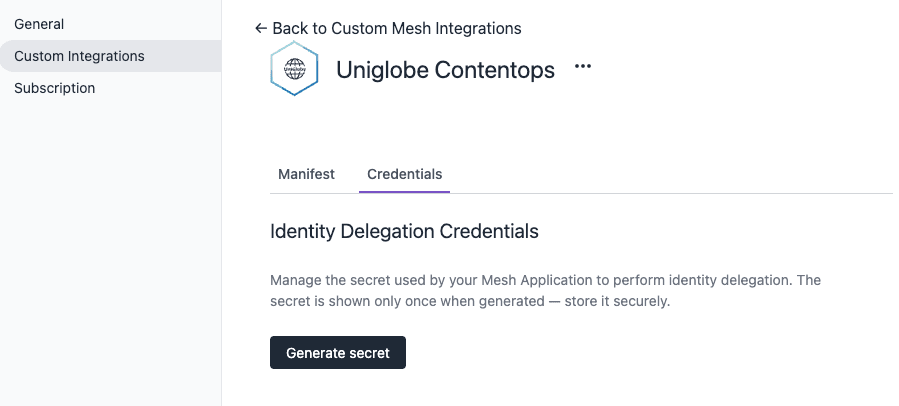
In the dashboard, generate the integration's delegation credentials (integration ID and app secret). Open the integration's Credentials tab and choose Generate secret.
Uniform shows the integration ID and app secret once. Copy both values before closing the dialog, because the secret can't be retrieved again.
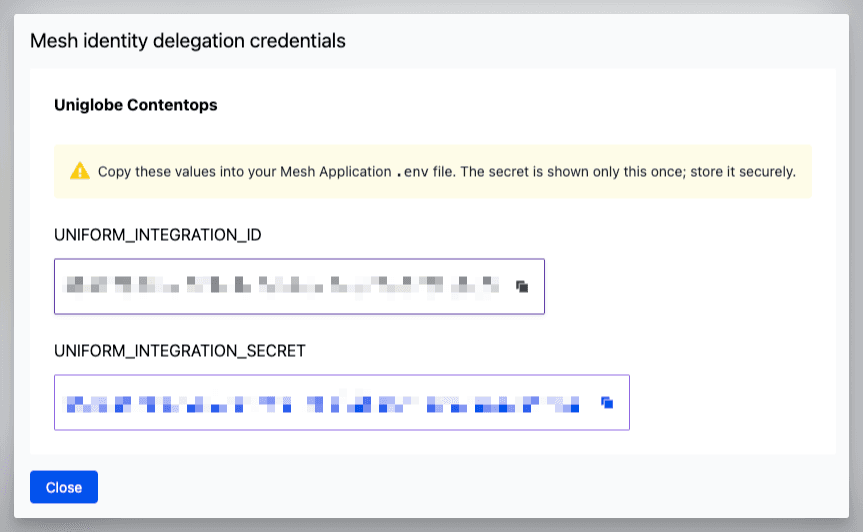
Put them in the mesh app .env together with API hosts and a cookie-sealing secret:
| Variable | Purpose |
|---|---|
UNIFORM_API_HOST | Uniform API origin. Use https://uniform.app for US-region teams and https://eu.uniform.app for EU-region teams. |
UNIFORM_INTEGRATION_ID | Integration definition ID (copy from integration's credentials) |
UNIFORM_INTEGRATION_SECRET | Integration app secret server only; never shipped to the browser (copy from integration's credentials) |
MESH_SESSION_SECRET | Long random string (at least 32 bytes) used to derive the key that encrypts your session cookie. Generate with node -e "console.log(require('crypto').randomBytes(32).toString('hex'))" |
MESH_ALLOWED_ORIGINS | Comma-separated HTTPS origin(s) of this mesh app (for example https://localhost:9002) |
4. Run over HTTPS#
The example serves on https://localhost:9002. Open Delegation Demo from the project tools menu. Your browser may show a one-time trust warning for the self-signed certificate.
Why HTTPS locally?
Delegation cookies use Secure. Browsers will not attach them on http://localhost. Do not disable Secure for local development. Serve HTTPS instead. Details are in Security mitigations and Troubleshooting.
How Uniform implements this (RFC 8693)#
Under the hood, identity delegation is an IETF RFC 8693 token exchange.
At a high level:
- The dashboard issues a very short-lived session token to your iframe (proof that a signed-in user consented to act through your integration).
- Your server exchanges that token, together with your integration credentials, for a delegation access token: a bearer JWT scoped to that user.
- Your BFF calls Uniform APIs with
Authorization: Bearer …using that access token. The browser never holds the access token or your integration secret.
Because the exchange happens on your server, neither your integration secret nor access token never reach the browser.
When the access token expires (on the order of minutes), your app obtains a new session token from the dashboard and exchanges it again. The reference example does not use backend refresh tokens.
Key terms#
| Term | Meaning |
|---|---|
| Session token | Extremely short-lived token (about 10 seconds) issued by the dashboard to the iframe via the Mesh SDK. Obtained in the browser with sdk.getSessionToken(). Send it once to your server; never store it in the browser. |
| Delegation access token | Bearer JWT issued by Uniform when your server exchanges the session token using your integration credentials. Used as Authorization: Bearer … when calling Uniform APIs on behalf of the user. |
Mesh SDK#
@uniformdev/mesh-sdk-react covers the React iframe UI. @uniformdev/mesh-sdk/server covers the BFF exchange and session cookie helpers. The mesh-auth example wires all of this end to end.
Wrap only what needs delegation
DelegationProvider and DelegationGate run checkActive, may call getSessionToken(), and render loading or disabled UI. That behavior is only appropriate for surfaces that actually call user-scoped Uniform APIs through your BFF. Static settings pages, marketing shells, or locations that rely solely on a static service account should stay outside the delegation tree, so they do not block on session exchange or show "delegation disabled" when the user never needed it.
React: provider, gate, and fetch#
DelegationProvider: runscheckActivefirst; if inactive, callssdk.getSessionToken()and youronSessionTokenhandler to establish the sealed session cookie. Tracks status (idle→acquiring→active|disabled|error). Optionally revalidates when the tab becomes visible again after being hidden.DelegationGate: renders children only when status isactive; supports loading, disabled, and error slots.useDelegationFetch:fetchwrapper that attaches the Mesh CSRF header and, on401withcode: 'delegation_expired', re-exchanges a session token and retries the request once.useDelegation:{ status, error, reacquire }for custom UI under the provider.
Project tool with DelegationProvider
Your checkActive / onSessionToken callbacks talk only to your BFF (for example GET /api/status and POST /api/session). The HttpOnly cookie isn't readable from JavaScript, so status must come from the server.
Session callbacks (browser → BFF)
Server: DelegationTokenClient#
Exchange the session token on your server with DelegationTokenClient from @uniformdev/mesh-sdk/server. The integration secret never leaves the server.
Exchange session token
On failure the client throws DelegationTokenError with a stable kind (bad_request, unauthenticated, forbidden, not_found, rate_limited, server_error, or unknown). Branch on error.kind rather than parsing message text.
Store the access token with the server helpers (sealDelegationSession, serializeSessionCookie, unsealDelegationSession, parseCookies). Then load the cookie on each BFF route and pass bearerToken: session.accessToken into Uniform SDK clients (for example CompositionManagementClient).
Use the delegation access token as the bearer token. Do not pass a static service account for user-scoped delegation flows.
POST /api/session: exchange + sealed cookie
BFF call with delegation bearer token
When the access token expires, clear the cookie and return 401 with code: 'delegation_expired' so useDelegationFetch (or reacquire()) can run the exchange again.
Security mitigations#
Identity delegation puts a powerful bearer credential on your origin. Treat the BFF as a security boundary. The mesh-auth example implements a recommended minimum.
HTTPS only#
Delegation cookies are Secure. Serve the mesh app over HTTPS in production and local development. Plain http://localhost will look like a broken session: the cookie is set after POST /api/session but never sent back.
HttpOnly, sealed cookie#
Keep the access token in an encrypted (JWE) HttpOnly cookie via sealDelegationSession / serializeSessionCookie. JavaScript can't read it. Prefer the default __Host- cookie name and short access-token TTL (re-exchange when expired rather than holding long-lived credentials in the browser).
Because the dashboard embeds your app in a cross-site iframe, the cookie must use SameSite=None, Secure, and Partitioned (CHIPS). serializeSessionCookie sets these for you. Do not weaken them for local development.
CSRF and origin checks#
SameSite=None removes the free CSRF protection of Lax. Guard every BFF route that touches the delegation session:
- Require the constant
X-Mesh-Csrf: 1header (CSRF_HEADER_NAME/CSRF_HEADER_VALUEfrom@uniformdev/mesh-sdk;useDelegationFetchadds it automatically). - Allow-list
Origin/RefereragainstMESH_ALLOWED_ORIGINS(verifyCsrffrom@uniformdev/mesh-sdk/server).
The header value isn't a secret. It works because browsers can't set custom headers on cross-origin requests without a CORS preflight, and these routes must not be CORS-open. Enabling permissive CORS on guarded routes silently removes this protection.
Short TTL and no secret in the browser#
- Session tokens last seconds and are one-shot into your BFF.
- Delegation access tokens last on the order of minutes; reacquire on expiry.
UNIFORM_INTEGRATION_SECRETexists only on the server.
Content Security Policy and related headers#
Lock down framing and baseline browser hardening. The example sets headers such as:
next.config.ts headers (excerpt)
Appendix#
Cookie flags reference#
| Flag | Value | Why |
|---|---|---|
HttpOnly | on | Scripts can't read document.cookie. |
Secure | on, always | Required with SameSite=None. Browsers will not send Secure cookies over plain http://, including http://localhost. Do not disable Secure for local dev. |
SameSite | None | Allows the cookie on cross-site iframe fetches to your origin. |
Partitioned | on, always | Opts into CHIPS. The cookie is stored under a partition keyed by (your origin × top-level site), so it survives Chrome's third-party cookie phase-out and gives per-embedder isolation. |
Firefox and Safari support for Partitioned is still partial; they fall back to standard SameSite=None; Secure semantics, so you don't lose functionality, just partition isolation.
Troubleshooting#
- Requests to your BFF return 401 even after a successful
POST /api/session. The session cookie is not coming back. This is almost always thehttp://localhostproblem:Securecookies aren't attached over plain HTTP. Serve your app over HTTPS. - The UI is stuck on "connecting" /
checkActivenever returns true. The cookie is being set but not sent on the follow-up fetch. ConfirmSameSite=None; Secure; Partitioned, that you callfetchwithcredentials: 'same-origin', and that your origin is HTTPS. sdk.getSessionToken()returnsundefined. Identity delegation is not enabled for this integration, or the current location/user flow can't mint a session token. Verify delegation is enabled on the integration definition.DelegationTokenClientthrowsforbidden/unauthenticated. CheckUNIFORM_INTEGRATION_IDandUNIFORM_INTEGRATION_SECRET, that the secret matches an integration with delegation enabled, and thatUNIFORM_API_HOSTmatches your team's region.POSTroutes return 403. TheX-Mesh-Csrfheader is missing, orOrigin/Refererisn't inMESH_ALLOWED_ORIGINS. Do not "fix" this by opening CORS.
Next steps#
- Learn how to scaffold a new integration in Custom Mesh integrations.
- Pair delegation with a Project Tools location to build user-scoped tools inside Uniform.
- Choosing credentials for non-interactive work? See API access and service accounts.