Parameter Type location
The Parameter Type location allows you to provide custom input controls for component parameters or entry fields.
This location is rendered in the property panel when a component parameter includes a parameter type that is defined in the integration manifest.
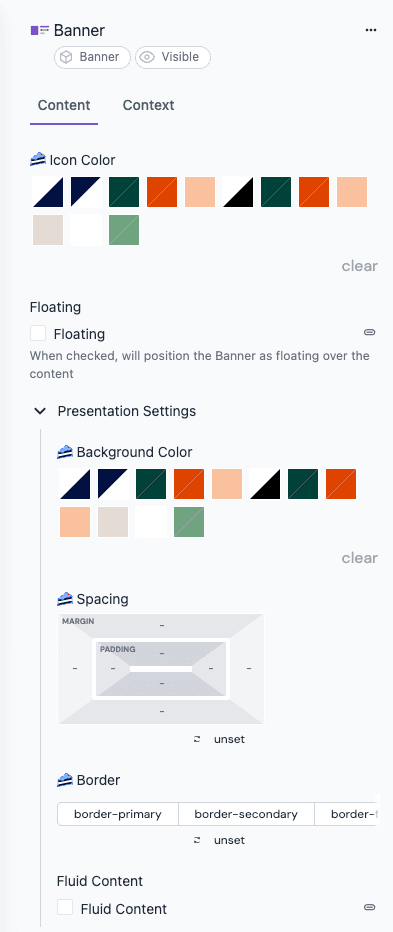
Example: Custom input controls from the Design Extensions integration.
Manifest configuration#
{
"locations": {
"canvas": {
"parameterTypes": [
{
"type": "parameter-type-id",
"editorUrl": "/parameter-type",
"displayName": "Parameter type name",
"configureUrl": "/parameter-type-config",
"renderableInPropertyPanel": true,
"allowedPlacement": ["parameter"]
}
]
}
}
}
Enabling custom parameters for content type fields
By default, custom parameters are only available for components. To enable them for content type fields, you need to set the following in the manifest configuration of the parameter type:
"allowedPlacement": ["parameter", "field"]
Location metadata#
The metadata object on a Parameter Type location includes:
| API | Description |
|---|---|
metadata.componentDefinitions | Component definitions index keyed by public ID |
metadata.parameterDefinition | Schema definition of the current parameter |
metadata.parameterConfiguration | User-configured settings for the parameter type |
metadata.component | Current component instance (without slots) |
metadata.rootNode | Root composition node (without slots or data) |
metadata.targetLocale | Locale being edited (undefined when the parameter is not localizable) |
metadata.currentLocale | Locale currently selected in the editor UI |
metadata.dynamicInputs | Dynamic inputs from the project map node |
metadata.connectedData | Resolved dynamic data connections for the component |
Editor state API#
The Parameter Type location also exposes the editorState object for reading and writing the surrounding composition or entry. See the Editor state API documentation for the full method reference.