Developing locally with Next.js App Router SDK
Local development tips#
When developing locally with the Uniform SDK, there are a few behaviors to be aware of that can affect your workflow. This page covers the most common friction points and how to work around them.
Next.js caches everything in .next#
By default, Next.js aggressively caches data fetched during rendering in the .next directory. This means that content you update in Uniform may not appear in your local app until the cache is cleared. If you change content in Uniform and don't see updates reflected locally, the fastest fix is:
- Stop the dev server.
- Delete the
.nextfolder. - Restart the dev server.
This is a blunt approach. The sections below describe better ways to avoid this problem during active development.
Working with draft content#
You do not need to publish content to see updates in your local development environment. The SDK can pull draft (unpublished) content directly, which is much faster for iterating on content changes.
To activate draft mode, the easiest method is to open your local app from the Uniform preview panel:
- Open a composition in Canvas.
- Click the preview panel.
- From the menu in the preview panel, choose Open in new window.
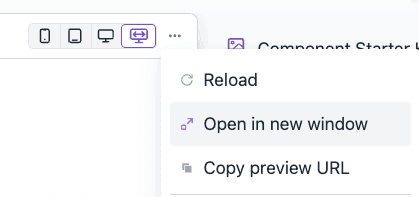
This opens your local app with the preview query parameters, which activates Next.js Draft Mode. While draft mode is active:
- The SDK fetches draft content instead of published content.
- Next.js data caching is bypassed (no stale content from
.next). - You see content changes immediately without restarting the dev server.
note
Make sure your UNIFORM_PREVIEW_SECRET environment variable is set in .env.local and matches the secret configured in your Uniform project's preview URL. Without it, the preview handler will reject the request.
Disabling Uniform caching for local development#
For a more permanent solution during development, you can disable all Uniform SDK caching in your uniform.server.config.ts. This tells the SDK to bypass the cache for every data fetch -- compositions, project map, and personalization manifest are always pulled fresh from the Uniform API.
warning
Do not deploy this configuration to production. Bypassing all caches causes every page render to make fresh API calls to Uniform, which significantly increases response times and API usage. This is acceptable for local development but will degrade performance in production.
A safe pattern is to use an environment variable to conditionally enable bypass:
This way, cache bypass is active only when running npm run dev and never in production builds.
Summary: when to use each approach#
| Approach | How | When to use |
|---|---|---|
Delete .next and restart | rm -rf .next && npm run dev | Quick one-off fix when content looks stale |
| Draft mode via preview | Open app from Uniform preview panel | Iterating on content changes without publishing |
bypassCache in server config | Set bypassCache: true for all caches | Ongoing development where you always want fresh data |
Conditional bypass via NODE_ENV | Wrap bypassCache in process.env.NODE_ENV === "development" | Safest option -- no risk of accidentally deploying with caching disabled |