Uniform Pulse
Uniform Pulse is an audit trail and activity report for your Uniform projects. It records each event that Uniform sends for a project and shows it in the Uniform dashboard, usually a few seconds after it happens.
Use Pulse to answer questions such as:
- Who published this page, and when?
- What changed in our project this week?
- Which content was edited but not published?
- Did someone delete many items in a short time?
- How much of our activity comes from people, and how much from API keys and automations?
Quick demo#
What Pulse gives you#
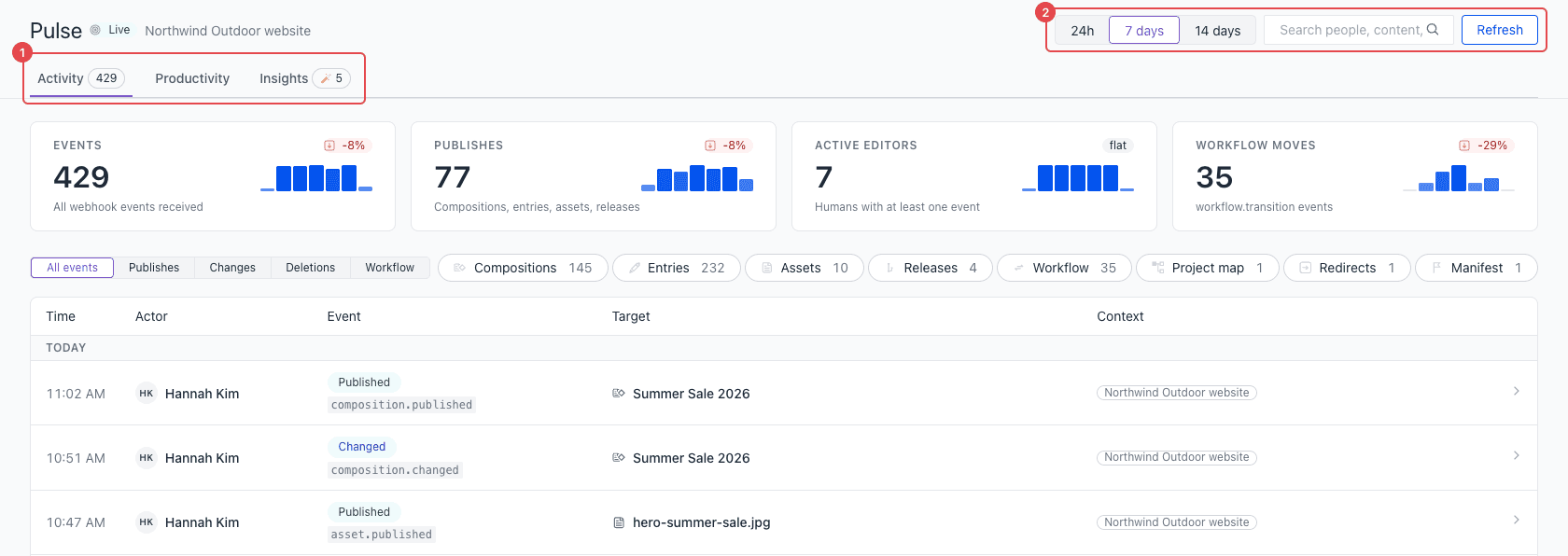
Pulse has three tabs:
Activity
A live feed of every event, with key numbers, filters, search, and full event details.
Productivity
How much your team publishes, where the work goes, and who does it.
Insights
Patterns that need your attention, such as deletion bursts and unpublished changes.
What Pulse records#
Pulse records these events from Uniform:
| Content | Events |
|---|---|
| Compositions and entries | Changed, published, and deleted. In a release, also restored. |
| Assets | Published and deleted. |
| Releases | Changed, deleted, launch started, and launched. |
| Workflow | Moved from one workflow stage to another. |
| Project maps | Project maps changed or deleted. Project map nodes added, changed, or deleted. |
| Redirects | Added, changed, and deleted. |
| Manifest | Published. |
| Notifications | Created. |
For each event, Pulse shows who did it, when it happened, and which item it changed. It also shows the source of the event:
- Uniform user: a person who used the Uniform dashboard.
- API key: an API key, a personal access token, or an automation. Scripts and AI agents that use an API key show here.
- System: an event that Uniform started itself, such as a scheduled release launch.
Pulse starts to record events when Uniform activates it for a project. It does not show events from before that time. Pulse keeps events for 90 days.
Open Pulse#
- In the Uniform dashboard, open a project that has Pulse.
- In the project navigation, select Tools.
- Select Pulse.
Pulse uses your Uniform sign-in. You can open Pulse for a project only if you have access to that project in Uniform.
Get Pulse#
Uniform activates Pulse for your team. To get Pulse, request activation.