Insights in Uniform Pulse
The Insights tab examines the events of the selected time range. It points out patterns that can need your attention. The number on the tab shows how many insights there are.
Insights always use all events in the range. The search does not change them.
Each insight has:
- A message that tells what Pulse found.
- Evidence: a maximum of three events that support the insight. To open the details of an event, select it.
- A confidence value. Each type of insight has a fixed confidence value.
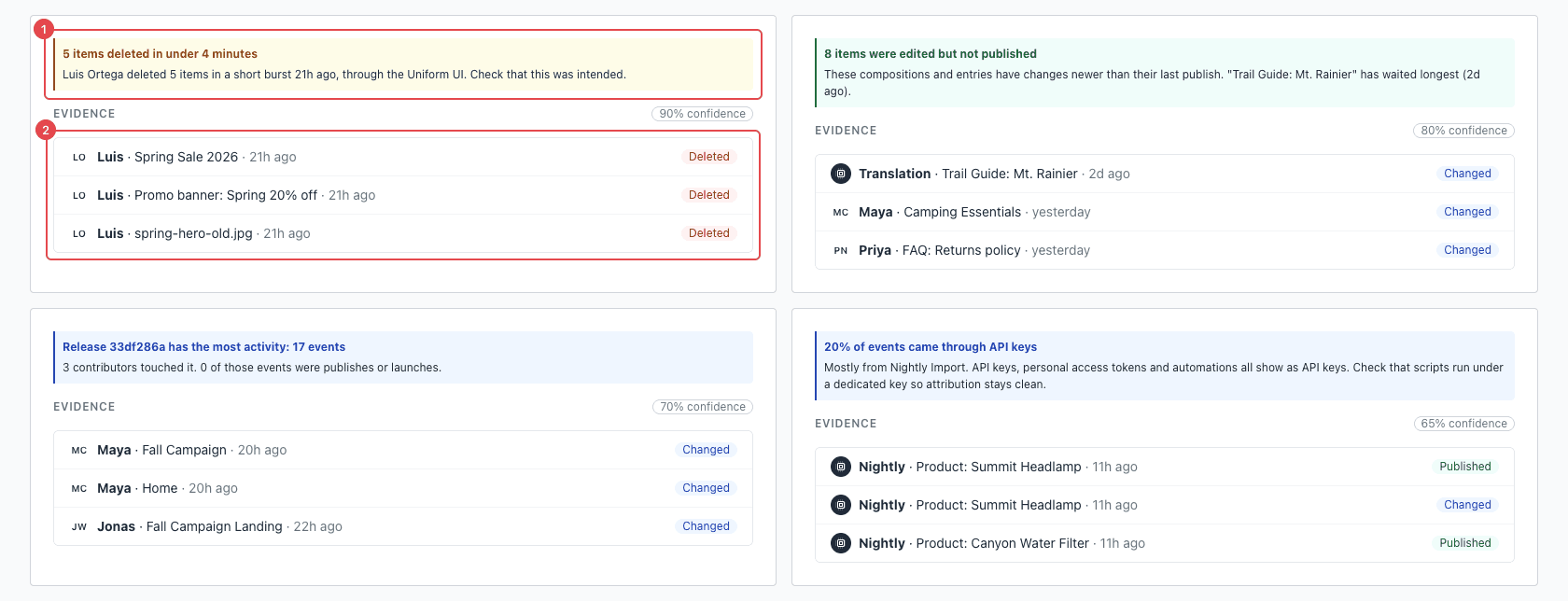
Each insight (1) shows the events that support it (2).
Types of insights#
| Insight | When it shows | What to do |
|---|---|---|
| Deletion burst | One person or API key deleted 3 or more items in 5 minutes. | Make sure that the deletions were intentional. If they were not, speak to the person, or find the script that uses the API key. |
| Edited but not published | A composition or entry has a change that is newer than its last publish, and the change is more than 6 hours old. | Publish the changes, or discard them. The message shows the item that has waited longest. |
| Release activity | There are events in a release. The insight shows the release with the most events. | Examine the release before it launches. |
| API key share | Some events came from API keys. The insight shows the percentage, and the API key with the most events. | Make sure that each script or integration uses its own API key. Then you can see which one made each change. |
| Weekend publishes | There are events from people in the range. The insight tells if people published on a Saturday or Sunday. | No action is necessary. Use it to examine your publishing policy. |
Pulse compares only the events in the selected range. For example, if an item was published before the range, the Edited but not published insight can show it after a change in the range.
Insights change when new events arrive. For example, an Edited but not published insight goes away after the items are published.