Automations
Enterprise plan only
The Automations feature requires a Uniform Enterprise plan. Please contact your Uniform representative to provision your project with this feature.
Automations are actions that execute automatically in response to events that happen in a Uniform project. Use them to attach custom logic to your content, to a schedule, or to signals from external systems, such as validation, enrichment, synchronization, notification, and workflow progression.
There are two ways to define an automation:
- Code automations are serverless TypeScript functions that run in a sandbox. You write them with the Automations SDK and deploy them with the Uniform CLI.
- Scout automations execute a prompt using Scout, Uniform's AI agent. You write instructions instead of code, and you create and manage them in the dashboard.
Both kinds use the same triggers, run under the same execution model, and appear together in the dashboard.
Use cases#
Automations are a good fit for jobs like these:
- AI-assisted editorial stages: when content enters a workflow stage, run an AI review (brand/tone, SEO), generate metadata or alt text, or translate it, then advance the workflow.
- Inbound synchronization: keep Uniform in step with external systems such as a PIM, DAM, commerce platform, or CRM. Receive a webhook when a product changes and update the corresponding entry.
- Outbound synchronization: push content changes downstream on publish, to rebuild a site, purge a CDN cache, or update an external search index.
- Validation gates: block or flag workflow progression on broken links, missing fields, or compliance violations before content advances.
- Scheduled maintenance: recurring jobs such as nightly syncs, batch re-tagging, unpublishing expired content, and periodic reporting.
- Governed AI actions: expose an automation as a tool that Scout can call to perform a deterministic, permission-scoped action on a person's behalf.
Manage automations#
Automations are created for projects and can be accessed under Settings > Automations, where you can see every automation registered for the project along with its runs and their logs. Only users with the Manage Automations permission can see and use these interfaces. See roles and permissions to grant it.
On the automations list you can:
- Enable or disable an automation.
- Delete an automation entirely.
- Create and edit Scout automations.
- Run a scheduled automation on demand.
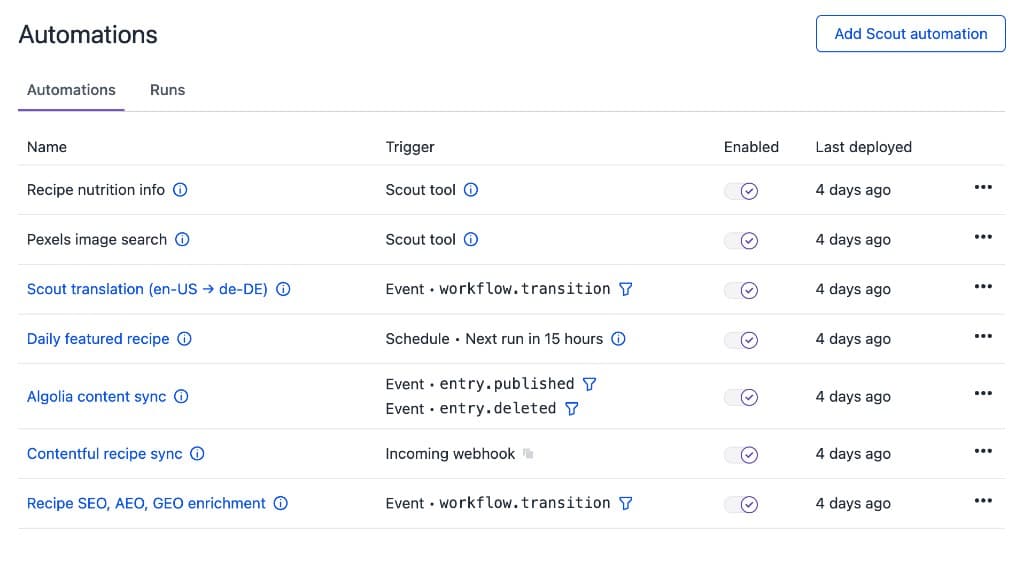
Code automations are authored and deployed with the Uniform CLI, which keeps their source in version control where it belongs. Deployed code is encrypted for your security, so it is not displayed in the dashboard.
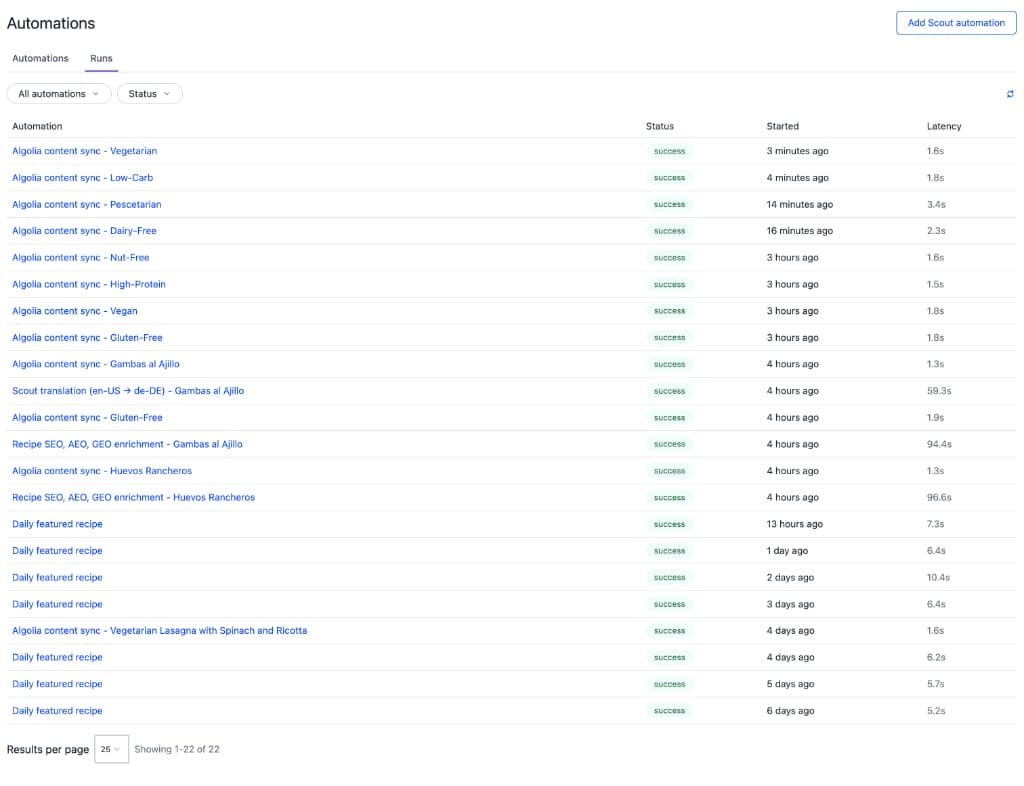
The Runs tab lists every execution, with status, start time, and latency. Open a run to inspect its logs. Runs and their logs are kept for 7 days after the run finishes.
Execution model and limits#
- Asynchronous: Automations run out of band, so authors never wait on them. A save, publish, or any other action that triggers an automation completes right away.
- Isolated runs: When one event triggers multiple automations, all of them trigger at the same time and may run in parallel.
- Loop protection: Automations can call Uniform APIs, which can trigger more automations. Two guards keep that safe: a write made by an automation will not re-trigger that same automation, and a depth limit stops ping-pong between automations. Runs stopped by either guard are recorded, so they stay visible in the run history.
Every run is subject to these limits:
| Limit | Value |
|---|---|
| CPU time per run | 5 minutes (time spent awaiting doesn't count) |
| Wall clock time per run | 15 minutes |
| Outbound HTTP requests per run | 100 |
| Deployed code bundle size | 1 MB |
Use an AI coding assistant
The uniform-automations agent skill teaches coding assistants such as Claude Code, Codex, Cursor, and Copilot how to write, test, and deploy code automations with the Automations SDK, including ScoutClient calls and syncs with external systems. To install it, see Uniform agent skills.
In this guide#
Triggers
Content events, schedules, incoming webhooks, and AI tools, plus filtering and combining them.
Code automations
Author, test, and deploy TypeScript automations with the Automations SDK, including calling Scout and notifying people.
Scout automations
Write instructions instead of code and let Scout carry them out on every trigger.
Best practices
Patterns that keep automations predictable and cheap to run.