Security audit log
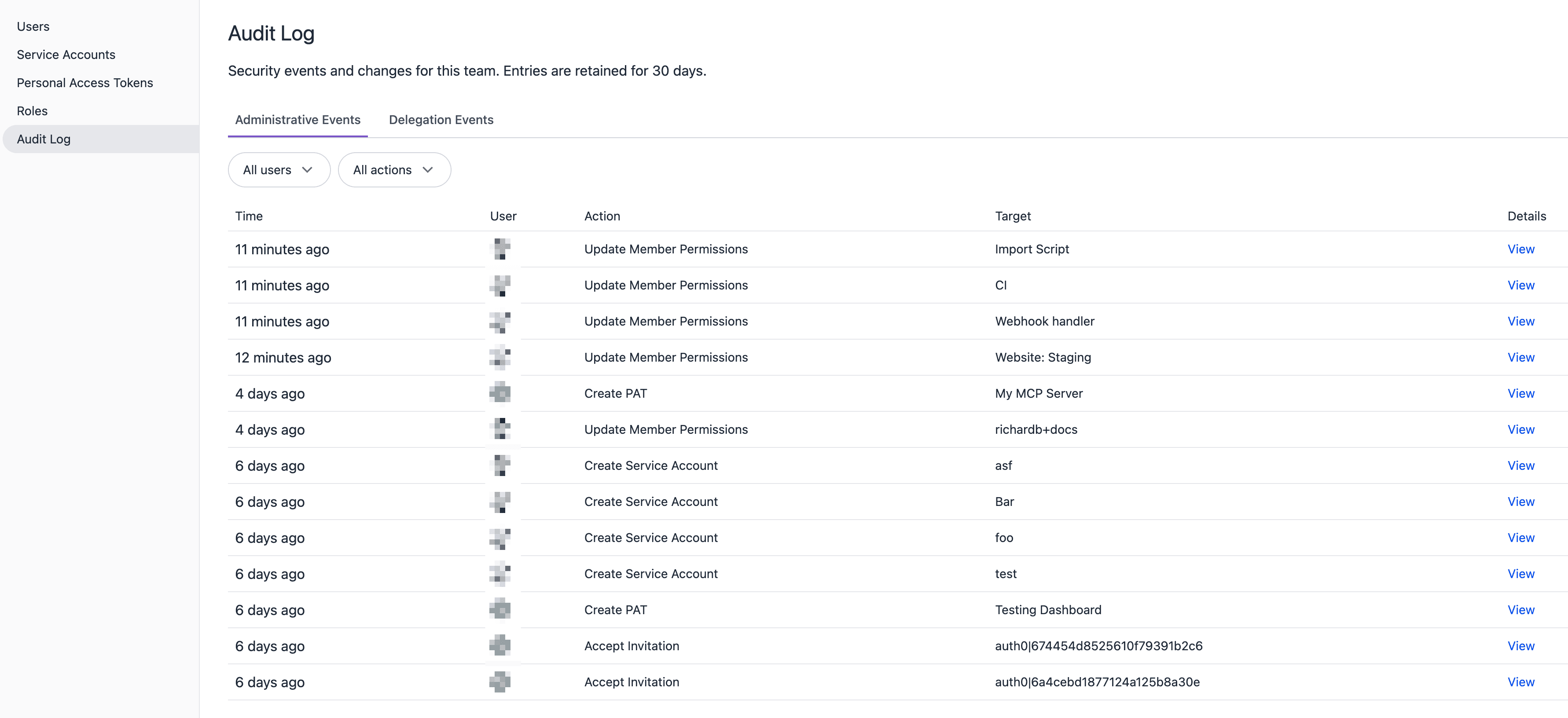
The security audit log records security-related events and changes for your team. Use it to track who created or deleted credentials, modified roles, or changed team membership.
Team admin access required
Only team admins can view the audit log.
Accessing the audit log#
- Open your team page in Uniform at https://uniform.app.
- Navigate to Security > Audit Log.
Retention#
Audit log entries are retained for 30 days. After 30 days, entries are automatically removed and cannot be recovered.
Event types#
The audit log tracks two categories of events, displayed in separate tabs:
Administrative events#
These are security-critical actions performed by team members or credentials:
| Event | Description |
|---|---|
| Create Service Account | A new service account was created. |
| Delete Service Account | A service account was deleted. |
| Create PAT | A new personal access token was created. |
| Delete PAT | A personal access token was deleted. |
| Prune PAT Roles | A personal access token's roles were automatically pruned because the owner's roles were reduced. |
| Update Member Permissions | A team member's project roles were changed. |
| Accept Invitation | A user accepted a team invitation. |
| Remove Member | A member was removed from the team. |
| Purge Identity | A user's identity was permanently erased, either because they deleted their own account or because an SSO user was removed from their last team. |
| Create Role | A new role was created. |
| Update Role | A role's permissions were modified. |
| Delete Role | A role was deleted. |
| Update Policies | Project policies were updated. |
| Create Integration Secret | A secret for a custom integration was created. |
| Regenerate Integration Secret | A custom integration secret was regenerated. |
| Delete Integration Secret | A custom integration secret was deleted. |
Delegation events#
Delegation events track identity delegation token operations (session token minting and refresh). These are displayed in a separate Delegation Events tab.
Reading an entry#
Each audit log entry includes:
| Column | Description |
|---|---|
| Time | When the event occurred (relative timestamp). |
| User | The identity that performed the action. For actions performed with a personal access token, this resolves to the token's owner. |
| Action | The type of event (see Event types). |
| Target | The name or ID of the affected entity (e.g. the service account name, the role name, or the member). |
| Details | Additional metadata about the event, viewable by clicking View. |
Filtering#
You can filter the audit log by:
- User: Show only events performed by a specific team member.
- Action: Show only a specific event type (e.g. only "Create PAT" events).
Filters can be combined to narrow results further.
Use cases#
- Security investigations: Determine who created or deleted a credential and when.
- Compliance auditing: Review credential and role changes over the past 30 days.
- Troubleshooting access issues: Identify when a member's permissions were changed or a token's roles were pruned.
- Onboarding/offboarding tracking: Verify that removed members' credentials were properly cleaned up.