Scout automations
Scout automations are created and managed directly in the Uniform dashboard, under Settings > Automations. Instead of code you write instructions, the same way you would brief a capable colleague. On every trigger, Uniform runs its AI agent, Scout, against those instructions with the trigger payload as context. Whatever Scout does in the course of following the instructions is what the automation does.
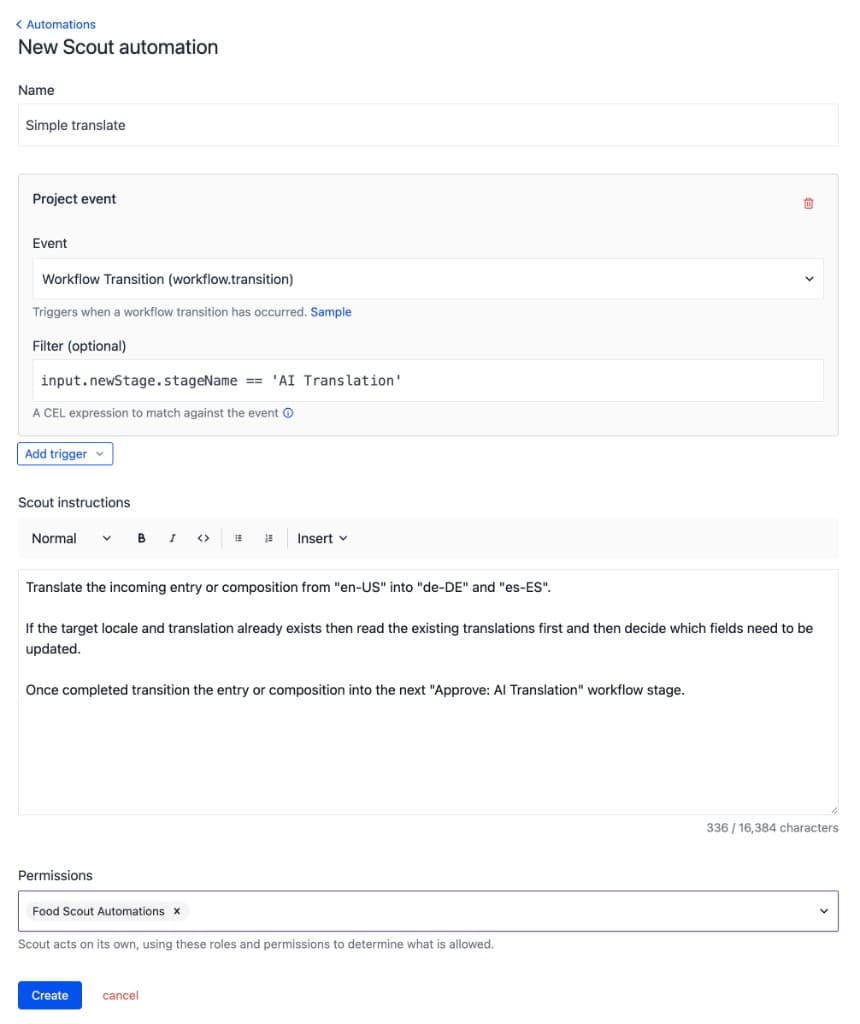
Scout automations use the same triggers as code automations, and their runs appear on the same runs list.
Authoring instructions#
Write instructions for a colleague who knows Uniform but not this particular job: state the goal, the inputs they can rely on, and what "done" looks like. The Scout best practices guide applies here too, with one difference. An automation has no one to ask follow-up questions of, so decide anything ambiguous in the instructions up front.
Scout runs with the permissions granted to the automation, so it can only do what those permissions allow. See roles and permissions.
AI credits#
A Scout automation run consumes AI credits at the same rate as using Scout in the dashboard. If the team's credits run out, runs pause until the next monthly allocation or a top-up.
attention
Use filters on Scout automations so they only execute when they are actually needed. An automation triggered on every entry save will consume credits on every entry save, including the ones it would have ignored.
When to use a code automation instead#
Use a code automation when the job is deterministic, needs secrets or third-party APIs, or must produce an exact result every time. Code automations can also call Scout for the parts of their work that benefit from an agent, which gives you deterministic control around an AI step.