Code automations
A code automation is a serverless TypeScript function that Uniform runs in a sandbox when one of its triggers fires.
Set up#
Install the SDK:
Use an AI coding assistant
The uniform-automations agent skill teaches coding assistants such as Claude Code, Codex, Cursor, and Copilot how to write, test, and deploy code automations with the Automations SDK, including ScoutClient calls and syncs with external systems. To install it, see Uniform agent skills.
To install only this skill, run:
Define an automation#
Each automation is a single TypeScript module that default-exports the result of defineAutomation({ metadata, handler }). Name automation files with the *.automation.ts convention, for example on-entry-changed.automation.ts.
The automation's public ID, which is its stable identifier, is derived from the filename, so on-entry-changed.automation.ts deploys as on-entry-changed.
on-entry-changed.automation.ts
The metadata and handler context are fully typed, so let your editor and the SDK typings be your reference rather than memorizing fields. The input type is inferred from the triggers: a single entry.changed trigger types input as that event's payload, and an AI-tool trigger types it from your inputSchema. An automation with multiple triggers receives a discriminated union that you narrow on input.eventType.
Returning nothing from the handler records the run as a success. To record something else, return an explicit outcome: rejected to skip an input, or unauthorized for a failed auth check. An unhandled exception is automatically recorded as a failure.
How automations run#
Each run executes in a sandbox, under an identity you grant it, with access to the secrets you deploy alongside the code.
Sandbox constraints#
Automations natively support TypeScript and can import other files or packages. Automations' sandbox is a web worker-like environment: there is no shell, no filesystem, and no Node.js APIs. Bundles are limited to 1 MB, and runs are subject to the execution limits.
The automation identity#
Automations with any trigger that is not aiTool can run as a Uniform identity scoped to the role or roles you grant in permissions. To call Uniform APIs as that identity, pass context.uniformCredentials to any Uniform API client. It carries the projectId and bearerToken they expect, such as EntryManagementClient and CompositionManagementClient.
- Specifying a role is optional. When no role is granted,
context.uniformCredentialsisundefinedand the automation cannot call Uniform APIs as an identity. - When deploying, you may grant an automation only roles you have yourself. Team admins can grant any role. Automations cannot run as a team admin.
aiTooltriggered automations run on behalf of the user invoking Scout and receive that user's permission set. They cannot declare a distinct identity.
Secrets and environment variables#
Environment variables with the UNIFORM_ENV_ prefix become available within your automations. The CLI loads a .env file automatically if one is present. Once deployed, your code is stored securely and any bundled secrets may not be retrieved.
Only UNIFORM_ENV_* values are available. Other environment variables are not included.
Calling Scout#
An automation can hand part of its work to Scout, which is useful when the job needs judgment rather than a fixed rule. Construct a ScoutClient from context.uniformCredentials instead of reading environment variables, and Scout runs under the automation's identity, limited to the roles you granted the automation.
Each call consumes AI credits. Pass an outputSchema when you need a machine-readable result back rather than prose. See the Scout Client SDK for the full API, including structured results and multi-turn threads.
AI-tool automations and Scout
An AI-tool triggered automation is already running inside a Scout turn, so it does the deterministic part of the work and leaves the reasoning to Scout. To call Scout from your own code, use any of the other triggers.
Notify people#
Run logs are for operators who inspect automation runs. To tell authors or stakeholders that work finished, send a dashboard notification or call an external channel such as email or Slack.
Dashboard notifications#
Construct a NotificationsClient from context.uniformCredentials, the same way you construct other Uniform API clients, and call create(). The notification appears in the dashboard header for each recipient.
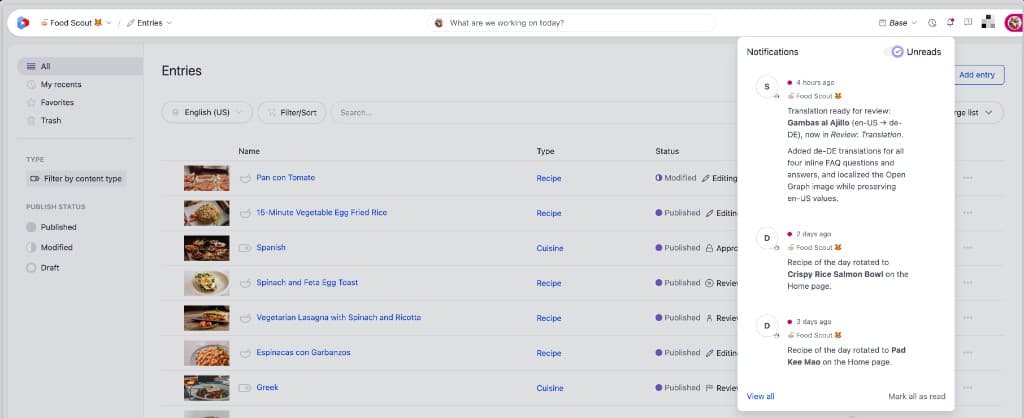
Recipients are Uniform subject IDs and must belong to the project's team. On content events, input.initiator.id is the person who made the change. The summary is markdown and limited to 256 characters. Pass an optional entity with a type and entityId if you want the notification to open the related entry or composition. Creating a notification requires the automation identity; without a granted role, uniformCredentials is undefined.
Email, Slack, and other channels#
To send email, Slack messages, or similar, call the provider from your automation using its API or SDK. Store webhook URLs and API keys as UNIFORM_ENV_* secrets. Those requests count toward the 100 outbound HTTP requests per run.
Testing#
Automations are ordinary functions, so you can unit-test them without any special harness: invoke the default export with a payload and assert on the returned object.
Deploying#
Deploy and manage automations with the Uniform CLI. Authentication and the target project come from the UNIFORM_API_KEY and UNIFORM_PROJECT_ID environment variables, and your API key must have Manage Automations permissions to deploy.
attention
Deployment is push-only. Your deployed code is stored securely and is not readable back out, which protects any secrets it carries. Keep your automation source in version control.