Use the Search SDK and API
This guide is for developers. It shows how to add Uniform Search to a Next.js app. It also shows how to call the Search SDK and the Search API from your own code.
Goals
- Add a search page to your Next.js App Router project in 30 minutes or less.
- Build custom search interfaces with the Search SDK and its React hooks.
- Send search requests to the Search API from any HTTP client.
Prerequisites
- A Uniform project with Uniform Search turned on. To get Uniform Search, request activation.
- Content in the search index. Refer to Configure search and Operate search.
- Team admin access to the Uniform Search tool, or a team admin who can give you the search API key.
- A Next.js project that uses the App Router and the Uniform SDK for the Next.js App Router. The project must have a component resolver.
- Tailwind CSS in the project. Without Tailwind CSS, the search components work, but they have no styles.
- A Uniform API key and project ID for the Uniform CLI.
note
The search components are for the Next.js App Router only. For other frameworks, use the Search SDK or the Search API directly.
How the parts fit together#
Your front end uses 4 parts of Uniform Search:
| Part | What it is |
|---|---|
| Search API | The HTTP API that runs search queries on the search index of your project. |
| Search API key | The read-only key that your front end sends to the Search API. The key starts with ufs. and works for one project only. |
| Search SDK | The npm package @uniformdev/search. It contains a search client for any JavaScript runtime and React hooks for the browser. |
| Search components | The Canvas components for search, such as Search Engine, Search Box, and Search Results. The create-uniform-search tool copies their React code into your project. |
Business users build search pages from the search components in Canvas. The search components call the Search API through the Search SDK. For custom interfaces, you can use the Search SDK or the Search API directly.
Add search to your Next.js app in 30 minutes or less#
You can add Uniform Search in 2 ways:
- Ask an AI coding assistant to do the work. This is the fastest path.
- Do the steps by hand.
In both ways, you first get the search URL and the search API key from the Uniform Search tool.
Get the search URL and the search API key#
The Connect drawer in the Uniform Search tool shows the search URL of your project. It also makes the search API key.
In your Uniform project, select Tools > Uniform Search in the project navigation.
In the status strip, click Connect.
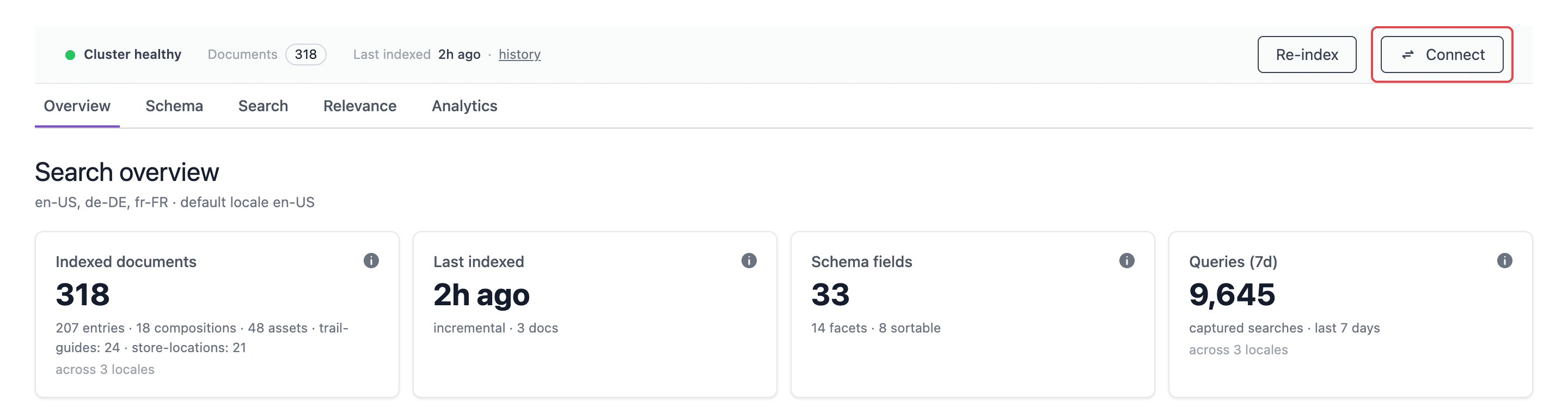 The Connect button in the status strip opens the Connect drawer.
The Connect your frontend drawer opens.
Click Generate key.
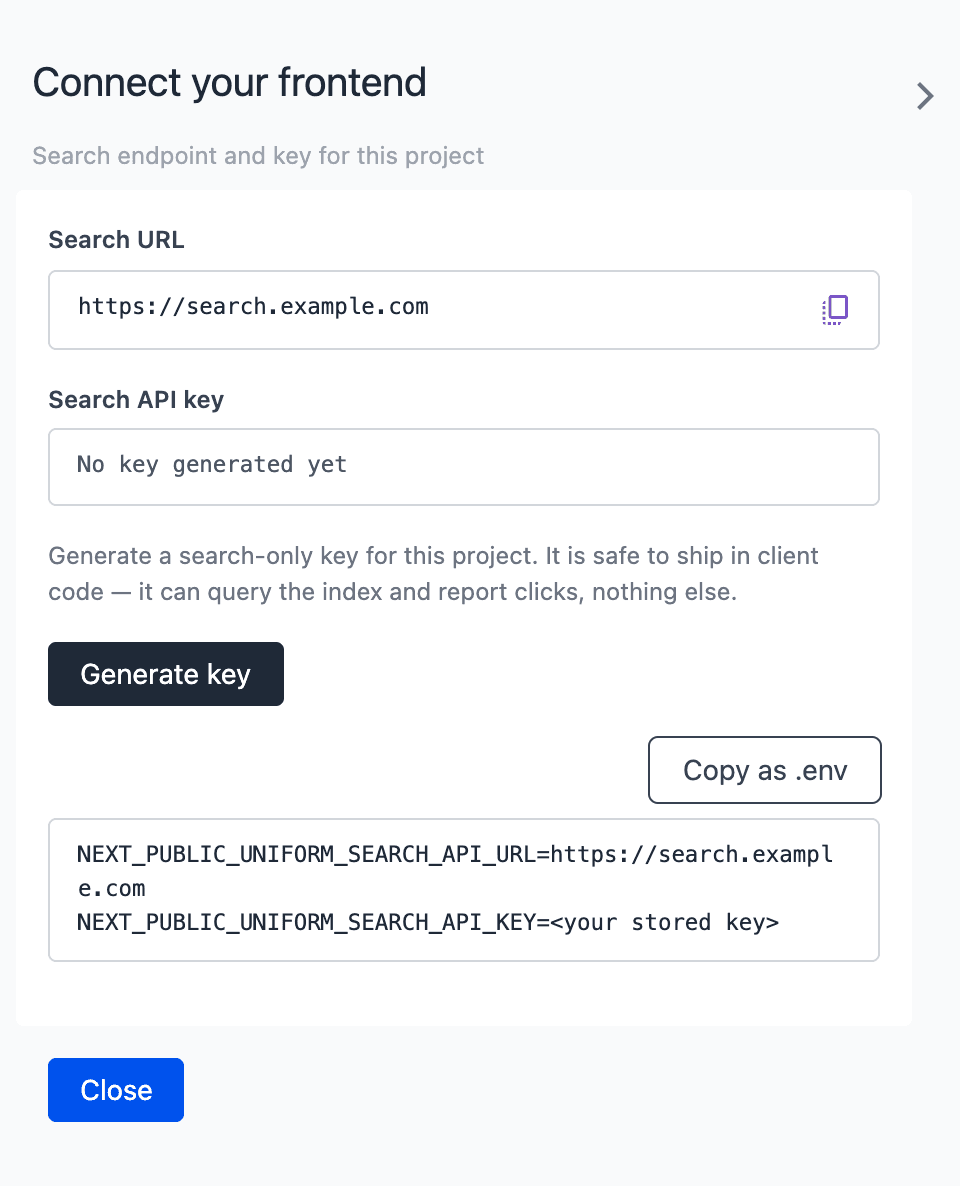 Generate a search API key in the Connect drawer.
warning
The drawer shows the full key 1 time only. You cannot get the key again later. If you lose the key, you must rotate it.
Click Copy as .env to copy the search URL and the search API key.
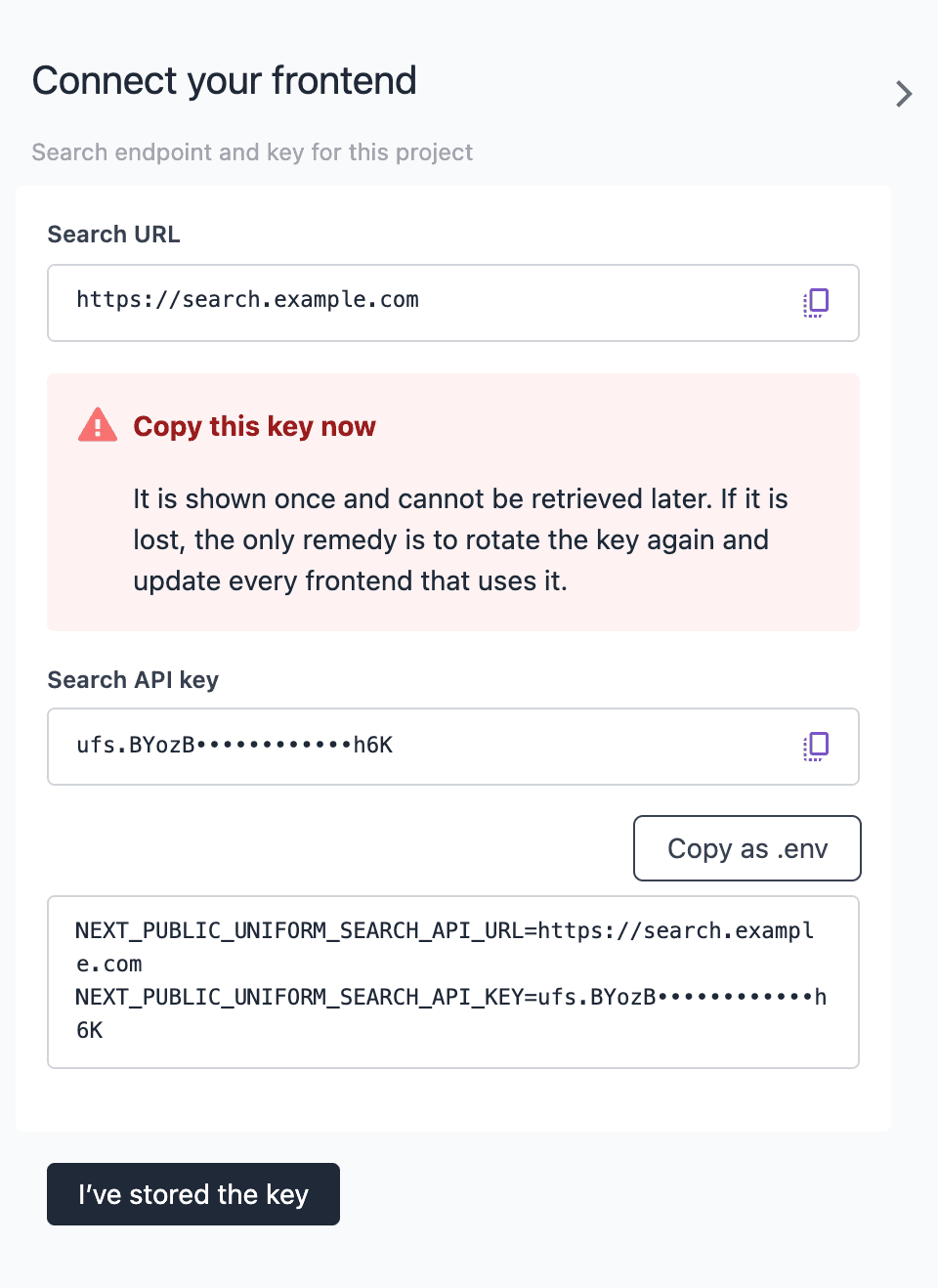 Copy the new key before you close the drawer.
Paste the values into the
.env.localfile of your Next.js project.Click I’ve stored the key.
The copied values look like this:
.env.local
If your project has more than one locale, add the default locale of your project:
.env.local
| Variable | Needed | Value |
|---|---|---|
NEXT_PUBLIC_UNIFORM_SEARCH_API_URL | Yes | The Search URL from the Connect drawer. Use the base URL only. The Search SDK adds /api/search. |
NEXT_PUBLIC_UNIFORM_SEARCH_API_KEY | Yes | The search API key from the Connect drawer. |
NEXT_PUBLIC_UNIFORM_DEFAULT_LOCALE | Only for localized projects | The locale to search when the page URL has no locale segment, for example on /. For a project with no locales, do not set this variable. |
info
You do not need a project ID for search. The search API key identifies your project.
Next.js adds NEXT_PUBLIC_ values to the JavaScript bundle when it builds the app. After you change a value, build and deploy the app again.
Ask your coding assistant to add Uniform Search#
The Uniform agent skills include a skill for Uniform Search. The skill teaches your AI coding assistant the correct steps for your project.
- Install the Uniform agent skills for your coding assistant. Refer to Uniform agent skills.
- Add the search URL and the search API key to
.env.local. Refer to Get the search URL and the search API key. - Open your Next.js project in your coding assistant.
- Enter a prompt, for example: "Add Uniform Search to my app."
The assistant runs create-uniform-search, installs the Search SDK, and registers the search components. It also checks the environment variables and the theme. The assistant does not push the component definitions. It gives you the command. Do the steps in Push the component definitions and Publish a search page.
Scaffold the search components by hand#
The create-uniform-search tool copies the search components, the helpers, and the component definitions into your project.
Find the base folder of the
@/*import alias intsconfig.json. For./*, the base is.. For./src/*, the base issrc.Go to the folder that contains the
package.jsonof your project.Run the tool. Replace
BASEwith the base folder andLOCALEwith the default locale of your project.npx -y create-uniform-search@latest --dir . --components --no-deploy --src-root BASE --locale LOCALEInstall the Search SDK:
npm install @uniformdev/search@latestMake sure that your project has the packages
@uniformdev/next-app-router-clientand@uniformdev/context. The search components import them.Import the theme file from your global stylesheet. For Tailwind CSS 4, add this line after
@import "tailwindcss";:app/globals.css
@import "../styles/search-theme.css";tip
For Tailwind CSS 3, copy the
monocolors fromstyles/search-theme.cssintotheme.extend.colors.monointailwind.config.js.Download the Uniform Context manifest. The behavior relevancy helpers read the enrichment categories from this file.
npx uniform context manifest download --output ./lib/uniform/manifest.jsonIf your project does not use
cacheComponents: trueinnext.config, changecomponents/search/Recommendations.tsxto fetch the project map paths directly. Refer to Recommendations without cache components.Do a type check and correct the errors that it shows:
npx tsc --noEmit
Command options#
| Option | Description |
|---|---|
--dir PATH | The project folder. The default is the current folder. |
--src-root PATH | The base folder for the components and helpers. It must be the base of the @/* alias, usually . or src. The alias --components-dir does the same. |
--components, --no-components | Copy, or do not copy, the components and the component definitions. |
--deploy, --no-deploy | Push, or do not push, the component definitions to your Uniform project. The push runs only when the tool finds UNIFORM_API_KEY and UNIFORM_PROJECT_ID. |
--skill, --no-skill | Install, or do not install, a Claude Code skill in .claude/skills/add-uniform-search. If you use the Uniform agent skills, use --no-skill. |
--locale CODE | The locale of the component patterns in the package. If you do not set it, the tool reads the default locale from your Uniform project. If it cannot, it asks you, or uses en. |
-y, --yes | Use safe defaults and ask no questions: copy the components, do not push, do not install the skill. The tool does not overwrite files that are already in the project. |
--dry-run | Show what the tool will do. The tool writes no files. |
-h, --help | Show the help. |
-v, --version | Show the version. |
warning
In a CI environment, or when there is no terminal, the tool asks no questions. Without --yes, it then overwrites files that are already in the project.
The tool reads UNIFORM_API_KEY and UNIFORM_PROJECT_ID from .env, then from .env.local, then from the environment. If your project is not on https://uniform.app, set UNIFORM_CLI_BASE_URL to the host of your Uniform project.
Files that the tool adds#
| Path | Contents |
|---|---|
BASE/components/search/ | The React code of the search components, the result card renderers, and the UI parts. |
BASE/lib/search/ | The helpers: searchClient.ts, projectMapClient.ts, typoTolerance.ts, retrieval.ts, enrichmentCategories.ts, and cachedProjectMapPaths.ts. |
BASE/styles/search-theme.css | The Tailwind CSS theme with the mono colors that the components use. |
search-components.json | The component definitions, the block types, the Uniform Search component category, and 2 component patterns: Search Engine and Search Autocomplete. |
uniformsearch.config.js | The Uniform CLI configuration that pushes search-components.json. |
The tool does not install the Search SDK, add environment variables, import the theme, or change your component resolver. When the tool stops, it shows the next steps.
lib/search/searchClient.ts makes the search client from the 2 environment variables:
lib/search/searchClient.ts
Recommendations without cache components#
The Recommendations component uses lib/search/cachedProjectMapPaths.ts. This helper uses the 'use cache' directive, and Next.js builds it only when cacheComponents is true. When you turn on cacheComponents, the change applies to all routes of your app.
If you do not want to turn on cacheComponents, do these steps:
In
components/search/Recommendations.tsx, replace the import ofgetCachedPathsByNodeIdwith this code:components/search/Recommendations.tsx
import { fetchPathsByNodeId } from '@/lib/search/projectMapClient'; const SEARCH_API_URL = process.env.NEXT_PUBLIC_UNIFORM_SEARCH_API_URL ?? '';In the same file, replace the line that calls
getCachedPathsByNodeIdwith this line:components/search/Recommendations.tsx
const pathsByNodeId = locale && SEARCH_API_URL ? await fetchPathsByNodeId(SEARCH_API_URL, locale) : {};Delete
lib/search/cachedProjectMapPaths.ts.
fetchPathsByNodeId keeps the paths in memory for each locale. Each server process sends 1 request for each locale.
Register the components in the resolver#
The search components use the compat component shape. Register them with createAdapterResolveComponentFunction in adapted mode. Keep the type IDs exactly as shown. They must match the component definitions.
components/searchMappings.ts
If your project already uses createAdapterResolveComponentFunction, add searchMappings to its mappings.
If your project uses a plain resolveComponent function, send the search types to the adapter first. Do not call the adapter as a fallback. The adapter returns a "Not implemented" component for types that it does not know.
components/resolveComponent.ts
The search components are client components. Do not remove the 'use client' directive. The Recommendations component is a server component.
Push the component definitions#
The push adds the search component definitions, the block types, the category, and the patterns to your Uniform project.
info
The push only creates the items that are not in your project. It does not change or delete items. You can run it again with no risk.
Add
UNIFORM_API_KEYandUNIFORM_PROJECT_IDto the.envfile of your project. The API key must have permission to create components, content types, and patterns.Go to the folder that contains
uniformsearch.config.js.Optional: show the changes before you push them:
npx @uniformdev/cli sync push --config ./uniformsearch.config.js --what-ifPush the definitions:
npx @uniformdev/cli sync push --config ./uniformsearch.config.jsIn Uniform, open the component definition of your page. Add Search Engine to the allowed components of the content slot.
If you want a search box in your site header, add Search Autocomplete to the allowed components of the header slot.
Open the Search Engine pattern. Make sure that the titles of the Order By items in Search Sort are in the language of your site. Change them if necessary.
Publish a search page#
In Uniform, create a composition for your search page, for example at the path
/search.Add the Search Engine pattern to the content slot. You can also add a Search Engine component and fill its slots.
On the Search Engine component, set Query By and Entry Url Mapping.
Add a Search Facet to the Facet Container for each field that visitors can filter by.
Look at the preview and make sure that results show.
Publish the composition.
Build and deploy your app.
For all component parameters, refer to Build search experiences.
Rotate the search API key#
Rotate the key when you think that someone else has it, or when your security policy tells you to. The old key continues to work for 24 hours. In this time, update all front ends that use it.
In the Uniform Search tool, click Connect.
Click Rotate API key.
In the Rotate the search key? dialog, click Rotate key.
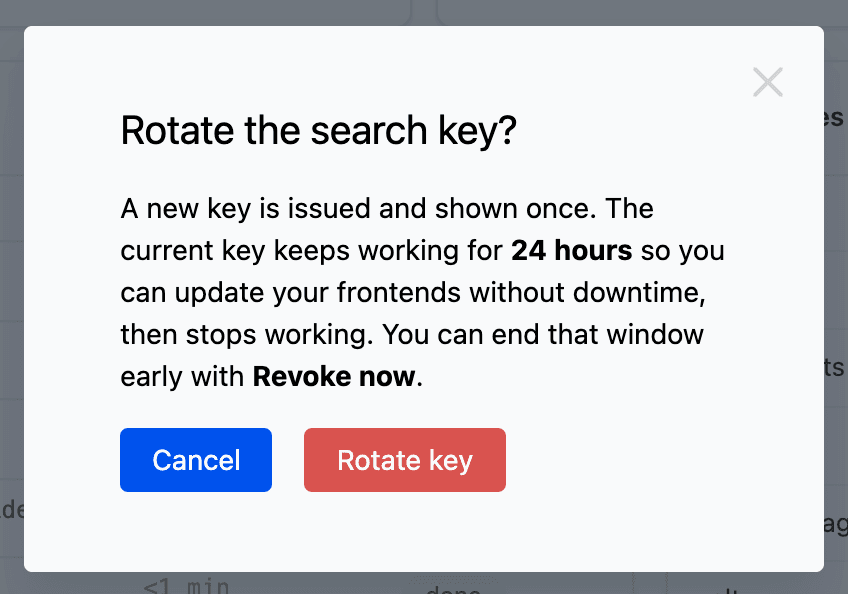 The old key continues to work for 24 hours after you rotate it.
Copy the new key.
Update
NEXT_PUBLIC_UNIFORM_SEARCH_API_KEYin all front ends. Then build and deploy them.Optional: to stop the old key before the 24 hours end, click Revoke now. Then confirm.
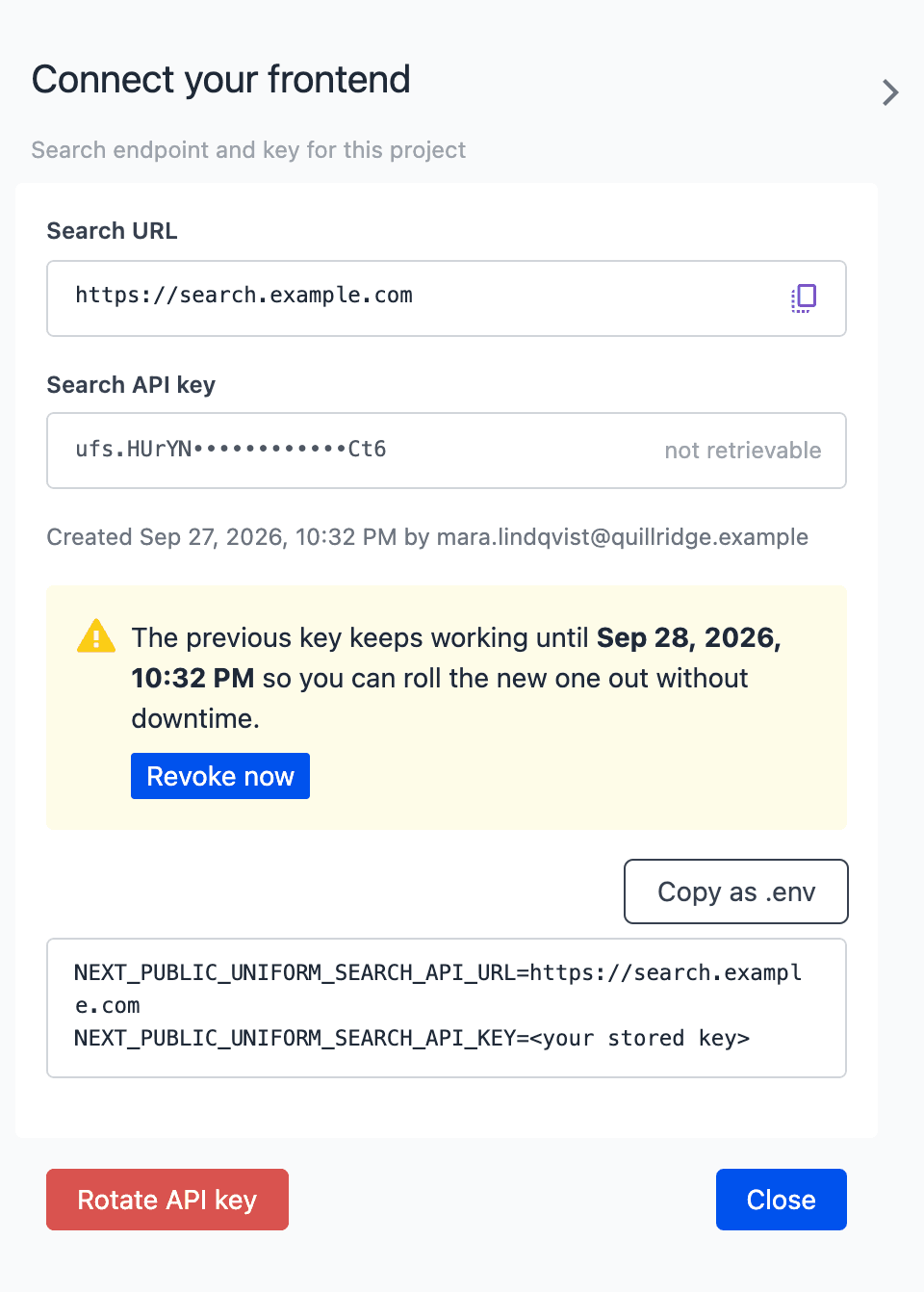 Revoke the previous key when all front ends use the new key.
warning
After you click Revoke now, the old key stops at once. Front ends that still use the old key get 401 Unauthorized.
Search SDK reference#
The Search SDK is the npm package @uniformdev/search. It needs React 18 or later only for the React entry point.
Entry points#
| Import path | Contents | Where it runs |
|---|---|---|
@uniformdev/search | The search client, the types, the constants, and the helpers. | Browser and server. It does not import React. |
@uniformdev/search/react | SearchProvider, the React hooks, and the URL resolver providers. | Browser only, in client components. |
createSearchClient#
createSearchClient(config) returns a search client with 2 functions: performSearch and trackClick.
| Config property | Type | Description |
|---|---|---|
apiUrl | string | The search URL from the Connect drawer. Needed. |
apiKey | string | The search API key. The client sends it in the x-api-key header. |
performSearch(params) sends a POST request to /api/search and returns the response. The function does not throw. If the request fails, it writes the status to the console, for example Search API error: 401. It then returns an empty result.
trackClick(params) reports a click on a result. Refer to Report clicks on results.
Search parameters#
performSearch accepts these parameters. The Search API accepts the same fields in the request body.
| Parameter | Type | Description |
|---|---|---|
search | string | The query text. An empty value matches all documents. |
page | number | The page number. The first page is 0. |
perPage | number | The number of results on each page. The default is 10. |
locale | string | The locale of the search collection, for example en-us. Needed for localized projects. |
queryBy | string | A comma-separated list of the fields to search. The default is all indexed text fields. If you do not set weights, results that match earlier fields rank higher. A field can have a weight after a ^, for example title^4. |
fieldWeights | Record<string, number> | string | The weight of each field in queryBy, from 0 to 127. A higher weight makes a match in that field rank higher. Refer to Field weights. |
filters | Record<string, unknown> | Filters with operators. Refer to Filters. |
baseFilterBy | string | A filter expression that applies to all requests, for example type:=product. The Base Filters parameter of Search Engine makes this value. |
facetBy | string | A comma-separated list of the facet fields. The response has counts for these fields. The fields must be facets in the schema. |
maxFacetValues | number | The maximum number of values for each facet. |
orderBy | string | The sort order. Refer to Sort order. |
predefinedSort | PredefinedSort | An editor-defined sort that applies before orderBy. Refer to Sort order. |
enrichmentBoost | EnrichmentBoost | The reduced visitor scores for behavior relevancy. Refer to Behavior relevancy. |
mode | 'keyword' | 'semantic' | 'hybrid' | The retrieval mode. Refer to Retrieval modes. |
semanticRatio | number | The weight of the semantic half in hybrid mode, from 0 to 1. The default comes from the project settings. |
maxDistance | number | Semantic matches farther than this distance are not in the results. A lower value is stricter. The default comes from the project settings. |
similarTo | string | A document ID. The results are the documents that are most similar to this document. The API ignores search. |
maxTypos | number | The maximum number of typos for each word: 0, 1, or 2. |
minLengthFor1Typo | number | The minimum word length for 1 typo. |
minLengthFor2Typos | number | The minimum word length for 2 typos. |
typoFallbackThreshold | number | If a query has fewer results than this value, the search tries again with more typos. |
prioritizeExactMatch | boolean | Put exact matches above matches with typos. |
diversityLambda | number | The balance between relevance and diversity for curations that diversify results. 1 is no diversity. 0 is maximum diversity. |
If you do not set a typo parameter, the search index uses its default value.
Field weights#
fieldWeights sets how important each search field is. The value goes to the search index as query_by_weights.
Send an object with a field name and a weight for each field:
- A weight is a whole number from
0to127. The API rounds down other numbers and changes values outside the range to the nearest limit. - A field in
queryBythat is not infieldWeightsgets the weight1. - You can use the field name without the locale for a localized field. For example,
titlealso sets the weight oftitle_en-us. - The object works also when you do not send
queryBy. The API matches the weights to the default fields.
You can also send a comma-separated string, for example "5,1". The string must have 1 weight for each field in queryBy, in the same order.
If the API cannot use the weights, it ignores them and runs the search. The response then has a message in warnings. This occurs if the string has the wrong number of weights, or if no field in the object is in queryBy.
The Query By parameter of the Search Engine and Search Autocomplete components sets the weights for you. Refer to Query By parameter values.
Query By parameter values#
The Query By parameter keeps a list of field names. Each name can have a weight after a ^, for example ["title^4", "shortDescription^2"]. Older compositions keep field names without weights, for example ["title"]. Use parseQueryByConfig to read both formats:
A list without weights gives queryBy only. Then results that match earlier fields rank higher.
The Search API also accepts the field^weight format in queryBy, for example "title^4,shortDescription^2". Thus, sites with older search components continue to work after editors add weights, and they also get the weights. If a request has fieldWeights too, the API uses fieldWeights.
Helpers and constants#
| Export | Description |
|---|---|
resolveEnrichmentBoost({ scores, categories, maxSignals }) | Reduces the visitor scores to the signals for behavior relevancy. |
getHighlightMatch(hit, fieldPath, fieldValue?) | Returns the highlight of a field as { html } or { values }, or undefined when the field did not match. The HTML keeps only the <mark> tags. |
sanitizeHighlightHtml(html) | Escapes all HTML except <mark> and </mark>. |
createDefaultUrlResolver(configs, options) | Makes a function that returns the URL of a result. Refer to Result URLs. |
buildOrderByQuery(orderBy) | Converts an Order By item into an orderBy value, for example price_ASC. |
toPredefinedSortParam(value) | Converts the value of the Predefined Sort parameter into a predefinedSort request value. |
resolveActivePredefinedSort(predefinedSort, currentOrderBy, defaultOrderBy) | Returns the predefined sort only while the default sort order is active. |
getSearchParamsFromUrl(url) | Reads the query string of a URL into an object. Repeated keys become arrays. |
flattenBlockParams(items, locale?) | Converts a Uniform $block parameter value into plain objects. |
parseQueryByConfig(value) | Converts the value of the Query By parameter into queryBy and fieldWeights. Refer to Query By parameter values. |
formatQueryByConfig(rows) | Converts { field, weight } rows into the value of the Query By parameter, for example ["title^4"]. |
SearchProvider#
SearchProvider keeps the search state for a search page. It sends the search requests and gives the results to the components inside it. The Search Engine component adds a SearchProvider for you. Do not add one to layout.tsx.
| Prop | Type | Description |
|---|---|---|
performSearch | (params: SearchParams) => Promise<CollectionResult> | The search function. Needed. Usually performSearch from createSearchClient. |
queryBy | string[] | The fields to search, in order of priority. |
fieldWeights | Record<string, number> | The weight of each field in queryBy. Refer to Field weights. |
baseFilterString | string | A filter expression for all requests. The provider sends it as baseFilterBy. |
locale | string | The locale of the search collection, for example en-us. |
searchDebounceMs | number | The time in milliseconds from the last keystroke to the request. The default is 300. |
maxFacetValues | number | The maximum number of values for each facet. The default is 100. |
enrichmentBoost | EnrichmentBoostSignal[] | The reduced visitor scores. The provider sends them only while the sort order is behavior relevancy. |
children | ReactNode | The search interface. |
SearchProvider also accepts orderBy and pageSizes. These props are for older compositions only. For new code, register the options from the child components.
The provider keeps the state in the URL query string. Visitors can share and bookmark a search:
| URL key | Value |
|---|---|
search | The query text. |
page | The page number. In the URL, the first page is 1. |
pageSize | The number of results on each page. |
orderBy | The sort order. |
The facet field key, for example brand | 1 key for each selected facet value. |
When a visitor selects a value in a facet, the provider also calculates the facet counts without the filter of that facet. Thus the facet continues to show all of its options.
The provider reads the URL in the browser. It gets the results after the page loads in the browser.
useSearch#
useSearch() returns the search state and the functions that change it. Use it in a component inside SearchProvider. Outside a provider, it throws an error.
| Field | Type | Description |
|---|---|---|
results | Pagination<SearchHit> | The current results: items, page, perPage, total, and totalPages. |
facets | Facets | null | The facet counts, by field and value. |
isLoading | boolean | true while a request runs. |
searchBoxValue, setSearchQuery(value) | The query text and the function that changes it. | |
page, setPage(page) | The current page and the function that changes it. The first page is 0. | |
pageSize, setPageSize(size) | The page size and the function that changes it. | |
orderByOptions, selectedOrderBy, setOrderBy(value) | The sort options, the current sort order, and the function that changes it. | |
registerFilterOption(facet), unregisterFilterOption(fieldKey) | Add or remove a facet. A facet is { fieldKey, type, title }. type is 'select', 'multiSelect', or 'range'. | |
selectedFilters, setSelectedFilters(map) | Record<string, string[]> | The selected facet values, by field. |
clearFilters() | Removes the query text and all selected values. | |
currentFilters | Record<string, unknown> | The selected facet values as a filters object. |
formatResultsSummary(template) | Replaces {page}, {perPage}, {totalItems}, and {totalPages} in a text. {page} starts at 0. | |
performSearch, queryBy, locale, baseFilterString | The values of the provider, for other components that send their own requests. |
The provider requests facet counts only for the facets that you register. This example shows a search box, a facet, and a list of results:
components/ProductSearch.tsx
useAutocomplete#
useAutocomplete(options) gives the state and the ARIA attributes for a search box with suggestions. It does not need SearchProvider. Use it in a site header or a dialog.
| Option | Type | Description |
|---|---|---|
performSearch | (params: SearchParams) => Promise<CollectionResult> | The search function. Needed. |
queryBy | string[] | The fields to search. |
fieldWeights | Record<string, number> | The weight of each field in queryBy. Refer to Field weights. |
baseFilterBy | string | A filter expression for all requests. |
filters | Record<string, unknown> | Filters with operators. |
locale | string | The locale of the search collection. |
perPage | number | The maximum number of suggestions. The default is 6. |
minQueryLength | number | The number of characters before the first request. The default is 1. |
debounceMs | number | The time in milliseconds from the last keystroke to the request. The default is 150. |
openOnFocus | boolean | Open the list when the input gets focus. The default is false. |
onSelect | (item: SearchHit) => void | Runs when the visitor selects a suggestion. |
onSubmit | (query: string) => void | Runs when the visitor pushes Enter and no suggestion is active. |
maxTypos, minLengthFor1Typo, minLengthFor2Typos, typoFallbackThreshold, prioritizeExactMatch | The typo parameters. Refer to Search parameters. |
The hook returns query, setQuery, suggestions, isLoading, isOpen, activeIndex, activeItem, open, close, clear, and selectItem. It also returns the prop getters getLabelProps, getInputProps, getListboxProps, and getItemProps. The prop getters add the WAI-ARIA combobox attributes and the keyboard support: Arrow Up, Arrow Down, Home, End, Enter, and Escape.
components/HeaderSearch.tsx
The search page reads the search URL key. Thus /search?search=QUERY opens the search page with the query.
useSimilarItems#
useSimilarItems(docId, options) returns the documents that are most similar in meaning to one document. Use it for "related articles" or "similar products". It does not need SearchProvider.
| Option | Type | Description |
|---|---|---|
performSearch | (params: SearchParams) => Promise<CollectionResult> | The search function. Needed. |
limit | number | The number of items. The default is 6. |
locale | string | The locale of the search collection. |
baseFilterBy | string | A filter expression, for example to get only 1 content type. |
filters | Record<string, unknown> | Filters with operators. |
maxDistance | number | Items farther than this distance are not in the results. |
enabled | boolean | Set to false to stop the request. The default is true. |
The hook returns { items, loading, error, degraded, refetch }. The source document is not in items.
components/SimilarProducts.tsx
This hook needs semantic search. If semantic search is off, the results are keyword results and degraded is true. To turn on semantic search, contact your Uniform representative.
Pagination hooks#
useSearchPagination(siblingCount?) reads the state of SearchProvider. It returns { pages, currentPage, hasPrev, hasNext, goToPage, goToPrev, goToNext, isLoading }.
pages contains page numbers that start at 1. It also contains the DOTS value, '...', for gaps. currentPage and goToPage use page numbers that start at 0.
components/Pager.tsx
usePagination({ currentPage, totalCount, perPage, siblingCount }) calculates the same page list from your own values. It does not need SearchProvider.
Result URLs#
A result does not always have a URL. The URL resolver makes the URL of each result from the Entry Url Mapping parameter.
createDefaultUrlResolver(configs, { pathsByNodeId, locale }) returns a function (hit) => string | undefined. Each config is a SearchItemConfig:
| Property | Type | Description |
|---|---|---|
source | string | The source of the result, for example entry. |
type | string | The content type of the result, for example article. |
nodeId | string | The project map node of the page for this type. The resolver uses the path of this node. |
urlTemplate | string | A path with tokens, for example /blog/:slug. The resolver uses it when there is no nodeId. |
tokenMapping | Record<string, string> | The result field for each token, for example { slug: 'slug' }. |
The resolver replaces each :token with the mapped field of the result. For a composition, the resolver uses the path field of the result.
To change the URLs of all results in a part of the page, wrap it in SearchItemUrlResolverProvider. useUrlResolver() returns your resolver, or the default resolver of the Search Engine component.
components/SearchUrls.tsx
The scaffolded components get the project map paths from the Search API with the search API key. You do not need to call this endpoint yourself.
Behavior relevancy#
Behavior relevancy puts the results that match the interests of the visitor first. It uses the enrichment scores from Uniform Context. For information about enrichments, refer to Enrichments.
To use behavior relevancy in code:
- Get the visitor scores with
useScores()from@uniformdev/next-app-router-client. - Reduce the scores with
resolveEnrichmentBoost. It keeps the highest value in each category and the 3 highest categories. - Give the result to the
enrichmentBoostprop ofSearchProvider. - Set the sort order to
behavior.
resolveEnrichmentBoost accepts these options:
| Option | Type | Description |
|---|---|---|
scores | Record<string, number> | undefined | The visitor scores. The keys have the form CATEGORY_VALUE. |
categories | string[] | The enrichment category IDs, for example Object.keys(manifest.project.pz.enr). |
maxSignals | number | The number of categories to keep. The default is 3. |
components/PersonalizedSearch.tsx
The Search Engine component does these steps for you. Authors turn on behavior relevancy in Canvas. They add an Order By item with the field Behavior relevancy (Uniform Context) to Search Sort, or they select it in Predefined Sort.
note
Documents that were indexed before your project used enrichments have no enrichment data. Start a re-index to add it. When a request sorts by behavior relevancy with visitor scores, it uses keyword retrieval only.
If a visitor has no scores, the results have the default relevance order. The facet counts and the total do not change.
Recommendations#
The Recommendations component shows the content that matches the interests of the visitor. It is a server component in components/search/Recommendations.tsx.
The component reads the visitor scores from the ufvd cookie on the server. It sends 1 search request with an empty query and the behavior sort order. It renders inside <Suspense>, so the rest of the page can render first.
This example shows the same request in your own server component:
components/ForYou.tsx
Put the component inside <Suspense>. It reads a cookie, so Next.js renders it for each request.
Report clicks on results#
trackClick(params) reports a click on a result to search analytics. The data shows in the Analytics tab of the Uniform Search tool. The function does not throw and does not stop the navigation.
| Parameter | Type | Description |
|---|---|---|
docId | string | The ID of the result. Needed. |
locale | string | The locale of the search collection. |
userId | string | A stable visitor ID for aggregation. |
The scaffolded Search Results component does not report clicks. To report clicks, add trackClick to your result list:
components/ResultLink.tsx
If analytics or click reports are off for the project, the Search API accepts the click and does not record it. For the analytics settings, refer to Operate search.
Search API reference#
Use the Search API when you cannot use the Search SDK, for example from another language.
All requests go to the search URL from the Connect drawer, for example https://YOUR_SEARCH_API_HOST. Send the search API key in the x-api-key header.
| Endpoint | Description |
|---|---|
POST /api/search | Runs a search query. |
POST /api/track | Reports a click on a result. |
POST /api/search#
Send a JSON body with the Content-Type: application/json header. All fields are optional. For the full list, refer to Search parameters.
| Field | Type | Example |
|---|---|---|
search | string | "duvet" |
page | number | 0 |
perPage | number | 10 |
locale | string | "en-us" |
queryBy | string | "title,shortDescription" |
fieldWeights | object or string | { "title": 5, "shortDescription": 1 } |
filters | object | { "brand[in]": ["acme"], "price[lte]": 50 } |
baseFilterBy | string | "type:=product" |
facetBy | string | "brand,price" |
maxFacetValues | number | 20 |
orderBy | string | "price_ASC" |
predefinedSort | object | { "type": "field", "field": "created", "direction": "desc" } |
enrichmentBoost | object | { "values": [{ "cat": "int", "key": "duvets", "score": 60 }] } |
mode | string | "hybrid" |
semanticRatio | number | 0.3 |
maxDistance | number | 0.75 |
similarTo | string | "DOCUMENT_ID" |
maxTypos | number | 1 |
minLengthFor1Typo | number | 6 |
minLengthFor2Typos | number | 12 |
typoFallbackThreshold | number | 3 |
prioritizeExactMatch | boolean | true |
diversityLambda | number | 0.5 |
Filters#
filters is an object. Each key is a field name with an operator. If there is more than 1 key, a document must match all keys.
| Key | Value | Matches |
|---|---|---|
field[eq] | A string or a number | Documents where the field is equal to the value. |
field[in] | An array | Documents where the field is equal to 1 of the values. |
field[gte] | A number | Documents where the field is equal to or more than the value. |
field[lte] | A number | Documents where the field is equal to or less than the value. |
field | A string or a number | Documents where the field is equal to the value. This is the same as [eq]. |
For a range, send [gte] and [lte] for the same field. The Search API escapes all filter values.
baseFilterBy and filters apply together. A document must match both.
Sort order#
orderBy value | Sort order |
|---|---|
| Empty or not set | Relevance. |
FIELD_ASC | The field, from low to high. For example price_ASC. |
FIELD_DESC | The field, from high to low. For example created_DESC. |
behavior | Behavior relevancy. Send enrichmentBoost with it. |
You can sort only by fields that are sortable in the schema. For more information, refer to Configure search.
predefinedSort is a sort that an editor sets on the Search Sort component. It applies before orderBy. orderBy then sorts the documents that have the same position. It has 3 forms:
In the conditional form, documents that match a rule with a higher score come first. With "direction": "asc", the matched documents come last. A document gets the highest score of the rules that it matches. The Search API ignores a predefined sort that is not valid.
A request can have a maximum of 3 sort clauses. A request can have only 1 conditional sort. If a conditional predefined sort and a behavior sort order are both in a request, the predefined sort wins. The response then contains a warning.
Behavior relevancy#
catis the enrichment category ID.keyis the value ID in the category.- The Search API uses a maximum of 3 signals.
maxSignalscannot increase this limit. - Scores must be more than 0. The Search API changes scores more than 100 to 100.
- The Search API ignores signals that are not valid. It does not return an error.
- If there are no signals, the results have the default relevance order.
Send the reduced signals only. Use resolveEnrichmentBoost from the Search SDK, or send the highest value of each category.
Retrieval modes#
mode | Result |
|---|---|
keyword | Results match the words of the query. |
semantic | Results match the meaning of the query. The results are in order of distance. |
hybrid | Keyword and semantic results in 1 list. |
If you do not set mode, the Search API uses hybrid when semantic search is on for the project. Otherwise it uses keyword. In most cases, do not set mode. Use keyword when meaning-based matches are wrong, for example for a lookup of part numbers.
Semantic search is not available in some conditions. Then the Search API returns keyword results with HTTP status 200, and degraded is true.
- In
hybridmode, the Search API ignores a fieldorderByand adds a warning. - A
behaviorsort order with signals, or a valid predefined sort, turns off semantic retrieval for the request. similarToreturns the documents that are most similar to one document. The source document is not in the results. The ID can contain only letters, digits,.,_,:, and-.
To turn on semantic search, contact your Uniform representative.
Response#
| Field | Type | Description |
|---|---|---|
data.items | SearchHit[] | The results on this page. |
data.page | number | The page number. The first page is 0. |
data.perPage | number | The number of results on each page. |
data.total | number | The number of documents that match. |
data.totalPages | number | The number of pages. |
facets | object | The counts for each facet field, by value. |
metadata | object | The custom data of a curation that applies to the query. Use it for banners and promotions. Not in the response when no curation has data. |
mode | string | The retrieval mode that the Search API used. Only for projects with semantic search. |
degraded | boolean | true when semantic retrieval was necessary but not available, so the results are keyword results. |
warnings | string[] | Notes about parameters that the Search API changed or ignored. |
Each result has the stored fields of the document from your schema, and these fields:
| Field | Description |
|---|---|
id | The document ID. |
_collection | entries, compositions, assets, or the ID of an external source. |
source | entry, composition, asset, or the ID of an external source. |
type | The content type or composition type. |
_highlight | The highlights, by field. The matched words are in <mark> tags. |
_highlights | The highlights as an array. Each item has a field. |
_textMatch | The keyword score. A higher value is a better match. |
_vectorDistance | The semantic distance. A lower value is a better match. Only when semantic retrieval ran. |
_matchedBy | keyword, vector, or both. Only when semantic retrieval ran. |
Localized fields have their plain names in the result. The response does not contain the vector data.
Examples#
curl
fetch
POST /api/track#
Reports a click on a result. Use the same header and key as for search.
| Field | Type | Description |
|---|---|---|
docId | string | The ID of the result. Needed. |
locale | string | The locale of the search collection. |
userId | string | A stable visitor ID. |
curl
The response is { "success": true, "recorded": true }. When analytics or click reports are off, recorded is false.
Status codes#
| Status | Body | Cause |
|---|---|---|
200 | The result | The request is correct. Semantic problems also return 200, with degraded: true. |
400 | { "error": "..." } | The similarTo value is not a valid document ID, or /api/track has no docId. |
401 | { "error": "Unauthorized" } | The request has no key, or the key is wrong or revoked. Or the body has a projectId of a different project. |
403 | { "error": "Forbidden" } | The origin of the request is not an allowed origin. |
404 | { "error": "Collection not found" } | There is no search collection for this project and locale. |
500 | { "error": "Internal error" } | An error occurred in Uniform Search. Try again later. |
Security#
- The search API key is read-only. It can search the index, report clicks, and read the page paths of the project map. It cannot change content or settings.
- The search API key works for 1 project only. A request with a
projectIdof a different project gets401. - The search API key can be in browser code. It is safe in
NEXT_PUBLIC_variables. - Keep push API keys on the server. A push API key can write documents to the search index. Never put a push API key in browser code or in a
NEXT_PUBLIC_variable. For push sources, refer to Configure search. - Uniform Search accepts browser requests only from the allowed origins of your deployment. To add the domain of your site, contact your Uniform representative.
- Only team admins can open the Uniform Search tool and make or rotate keys.
Cache and performance#
- Search requests use
POST. Thus a shared cache does not keep a copy of the results. This is important for behavior relevancy: the results of one visitor never go to a different visitor. Do not add a public cache in front of search requests. - The first results page can render on the server. Call
performSearchin a server component, as in the Recommendations example. SearchProviderruns in the browser. It gets the results after the page loads.SearchProviderwaits 300 milliseconds after the last keystroke before it sends a request.useAutocompletewaits 150 milliseconds. You can change these values.SearchProviderand the hooks ignore responses that come back after a newer request.- The project map paths stay in memory for each locale. The Recommendations component can also keep them in the Next.js cache for some minutes.
- When authors publish content, Uniform Search updates the search index. Your app does not need to do anything.
Troubleshooting#
| Problem | Cause | Solution |
|---|---|---|
The browser console shows Search API error: 401. | The request has no search API key, or the key is wrong or revoked. | Copy the key again from the Connect drawer. If you cannot find it, rotate the key. Then build and deploy the app again. |
All requests get 401 after an update of old code. | The code sends a projectId or NEXT_PUBLIC_UNIFORM_PROJECT_ID of a different project. | Remove projectId from createSearchClient and from the requests. The key identifies the project. |
Requests get 401 24 hours after a key rotation. | The front end still uses the previous key. | Update NEXT_PUBLIC_UNIFORM_SEARCH_API_KEY with the new key. Then build and deploy the app again. |
The browser console shows Search API error: 403. | The domain of your site is not an allowed origin. | Contact your Uniform representative and give the domains of your site. |
No results, and the browser console shows Search API error: 404. | There is no search collection for the locale of the request. | For a localized project, set NEXT_PUBLIC_UNIFORM_DEFAULT_LOCALE. You can also put a locale such as en-us in the first URL segment. Make sure that a re-index has run for this locale. |
No results for a localized project on /en/... paths. | The Search Engine component reads the locale from the URL only in the form xx-yy. | Set NEXT_PUBLIC_UNIFORM_DEFAULT_LOCALE. |
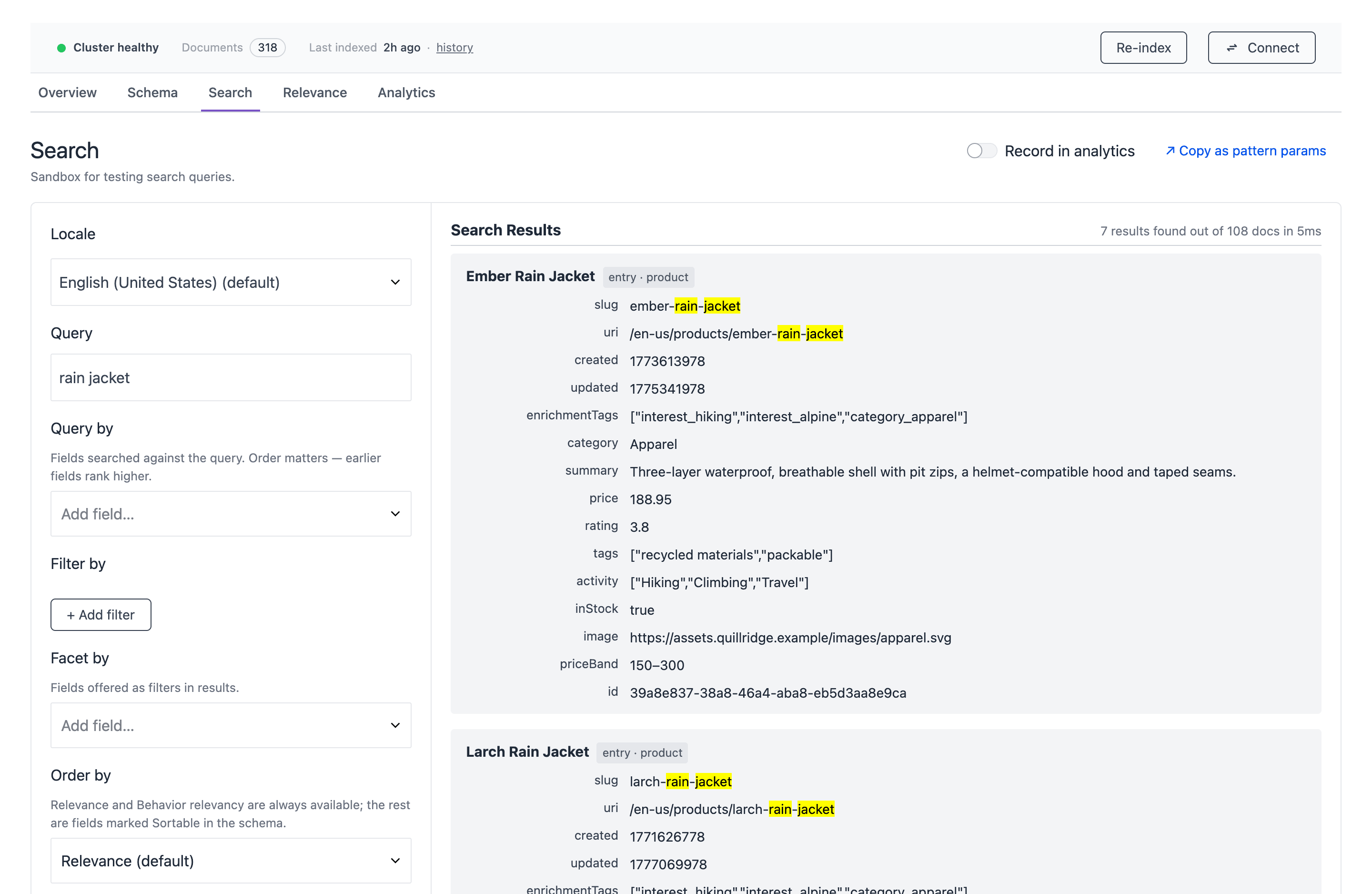
| No results and no error. | The query or the filters match no documents. | Run the same query in the Search tab of the Uniform Search tool. Send the locale in lowercase, for example en-us. |
| A new environment variable has no effect. | Next.js adds NEXT_PUBLIC_ values when it builds the app. | Build and deploy the app again. |
| No facet counts in the response. | No facet is registered, or the field is not a facet in the schema. | Call registerFilterOption for each facet. Set the field as a facet on the Schema tab. |
Results have degraded: true. | Semantic search is not available. The results are keyword results. | Look at warnings in the response. If a warning tells you to re-index, start a re-index. For other causes, contact your Uniform representative. |
| Behavior relevancy has no effect. | The documents have no enrichment data, the visitor has no scores, or the request has no enrichmentBoost. | Start a re-index. Make sure that the Context manifest contains your enrichment categories. |
| Composition results have no links. | The project map request failed. | Make sure that NEXT_PUBLIC_UNIFORM_SEARCH_API_KEY is set. Look for project map fetch failed in the browser console. |
The type check shows Cannot find module '@/lib/uniform/manifest.json'. | The Context manifest is not in the project. | Download the manifest. Refer to Scaffold the search components by hand. |
The build shows an error about "use cache". | cacheComponents is off. | Refer to Recommendations without cache components. |
The type check shows has no exported member 'toPredefinedSortParam'. | The Search SDK is older than the components. | Run npm install @uniformdev/search@latest. |
| A search component shows "Not implemented". | The resolver sends a type to the adapter that is not in searchMappings. | Send only the search types to the adapter. Refer to Register the components in the resolver. |
Next steps#
- Configure search: select search sources, set up the schema, and tune relevance.
- Build search experiences: build search pages in Canvas.
- Operate search: re-index content, manage keys, and read analytics.
- Uniform agent skills: let your coding assistant add search for you.